MSP automation
Automate onboarding without a script per client
Most MSPs already automate. A PowerShell script for new users, a Power Automate flow for a client who asked for one. That works, until another client comes along, an HR field changes or the engineer who wrote it leaves.
The short answer
Many MSPs automate onboarding with their own script or flow per client. Joinly replaces those scripts with one platform: each client's HR system drives the lifecycle, the rules sit per client in roles and workflows you change without code, and every change is in the audit log with its reason. Where you do want to write code, there is an API with keys per client.
How the script came about
It started for a good reason. A client was hiring a lot of people, the manual work was piling up, and a script was the quickest way to do it consistently. Then another client came along, and another, and each got an adapted copy.
A script like that usually does one thing well: create an account when someone runs it. Movers and leavers each need their own script, and they all only start once there is a ticket.
What a script per client costs you over time
Every copy has to be maintained when Microsoft changes something, when a client moves to a different HR system or when the naming convention has to change. The knowledge sits with whoever wrote it. And when a client asks why someone has access to a particular folder, you look for the answer in log files, if there are any.
The biggest gap is the signal. A script does not know that someone is joining or leaving. Your client's HR system does.
Rules you can read
In Joinly, what needs to happen per client is set out in roles and workflows. A workflow has a trigger, conditions and actions, and it reads the way you would explain it: when someone joins the Finance department, they get these groups, this licence and this welcome email. You change it without code.
Every change a workflow makes goes into that client's audit log, with the reason. A colleague who takes over the client sees on one screen what happens and why.
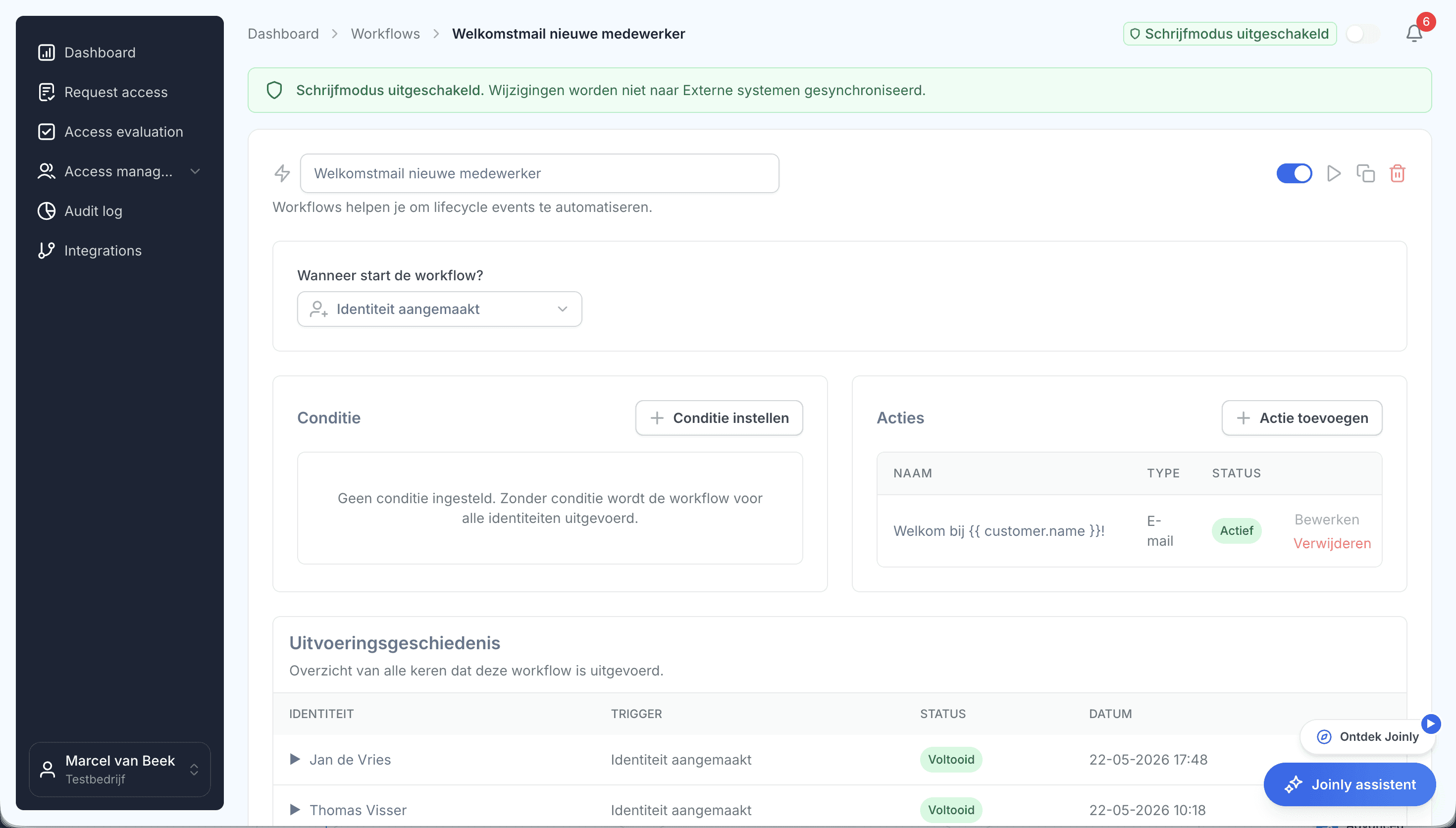
And where you do want to write code
There is always work that belongs to your services and not to Joinly. For that there is the API, with keys per client. For each key you decide what it may do, every change through the API is in the audit log with the name of the key, and you can revoke a key whenever you like.
A script per client or one platform
How day-to-day work differs, for the tasks that come back most often.
Your own script per client
Joinly
- Signal
- Your own script per client: A ticket or someone who runs the script
- Joinly: A change in HR
- Change of role
- Your own script per client: A separate script, or manual work
- Joinly: Roles adjust the access
- Leaver
- Your own script per client: A second script, if someone runs it
- Joinly: On the last day, from HR
- New client
- Your own script per client: Copy and adapt the script
- Joinly: New environment with your standard
- Who knows how it works
- Your own script per client: Whoever wrote it
- Joinly: Anyone who opens the workflow
- Why did this happen
- Your own script per client: Searching log files
- Joinly: Audit log with source and reason
MSP automation
Frequently asked questions
Can we keep using our existing scripts?
For joiners, movers and leavers, Joinly takes over the work of your scripts. Scripts for other tasks can stay where they are, or connect to Joinly through the API.
Is Joinly an alternative to Power Automate?
For the employee lifecycle, yes: Joinly follows HR and handles accounts, groups, licences and access, with an audit log per client. For other automation, Power Automate remains perfectly usable.
Do I need to be able to code to set up Joinly?
No. You set up roles and workflows without code. The API is there for whatever you want to connect in your own tooling.
How do I stop a mistake at one client from affecting lots of accounts?
A trial import shows you in advance what would change, and a threshold stops an import that suddenly changes far more than you expect.
Can I see who or what made a change?
Yes. Each client's audit log records for every change whether it came from HR, a workflow, an administrator or the API, and with which key.
- Joinly for MSPsFor an MSP, every joiner and leaver at a client is a ticket, a checklist and work that is hard to bill for. Joinly picks up those changes from your client's HR system and handles accounts, groups, licences and access automatically. For all your clients, from one login, with each client in its own environment.
- Onboarding and offboardingAn onboarding checklist per client and an offboarding ticket that arrives too late: for most MSPs, that is the work that comes back most often. With Joinly it starts as soon as your client records an employee in HR, and it follows the whole lifecycle.
- Multi-tenant identity managementYou probably have tenant management sorted already. What most MSPs do not do from one place is keep track of who should have an account at each client. That is where Joinly sits alongside your existing tooling.
- An HR integration per clientOne client uses AFAS, the next Nmbrs and a third a system you have never heard of. For an MSP, that is normal. Joinly connects them all to Microsoft Entra ID or Active Directory in the same way.
Account management for your clients as a standard service?
In an introduction we walk through how Joinly would work for your clients: which HR systems, which environments and where you want to start. We agree the terms of a partnership in the same conversation.
Book an introduction