
Dayforce → Microsoft Entra ID
Integrate Dayforce with Microsoft Entra ID
When someone joins, moves or leaves in Dayforce, you want that change reflected in Microsoft Entra ID without anyone touching it by hand. To connect Dayforce to Microsoft Entra ID, Joinly reads each HR change at the source — through the Dayforce REST API — and applies it automatically to the right account. Dayforce stays your source of truth; Joinly is the engine that keeps every action accurate and traceable.
Key takeaways
Dayforce stays your source of truth; Joinly applies every joiner, mover and leaver to Entra ID automatically.
Joinly maps Dayforce structures — legal entity, location, department, job and position — to the right Entra ID groups and licences, something the middleware connectors can't decide on their own.
Joinly resolves Dayforce XRefCodes for every lookup value, so a department, position or pay group always lands on the correct group rather than failing with a silent 400.
Termination in Dayforce and deprovisioning in Entra ID are no longer decoupled — Joinly disables the account on the termination date instead of leaving access live after someone has left.
Every action is logged for a complete audit trail, aligned with NIS2 and ISO 27001.


Quick facts
Source system | Dayforce (Dayforce HCM) |
Target system | Microsoft Entra ID (formerly Azure AD) |
Connection method | Dayforce REST API → Entra ID |
Supported events | Joiner, mover, leaver (incl. rehire, status change, future-dated work assignment) |
Synced attributes | Name, email / UPN, department, job, position, manager, location, legal entity, pay group, hire and termination date |
Authentication | OAuth 2.0 via the Dayforce developer portal |
Real-time or batch | Frequent sync, multiple times per day |
Compliance | ISO 27001, NIS2-ready, GDPR (EU data centre) |
Liever in het Nederlands? Dayforce koppelen met Microsoft Entra ID
How does Joinly sync Dayforce to Microsoft Entra ID?
Joinly reads each HR change in Dayforce through the REST API and applies it to the matching Entra ID account automatically. Dayforce holds a single combined HR and payroll record per employee, so it is the authoritative starting point for each identity action.
Joiner. HR completes the hire in Dayforce. Joinly reads the new employee record, resolves the XRefCodes for department, position, location and pay group, and determines the role from those values. It then creates the account in Entra ID, assigns the right licences and maps the person into the correct groups — timed to the hire date on the record.
Mover. When someone changes position, department or location in Dayforce, Joinly updates their group membership, permissions and licences to match. Access that no longer fits the new position is revoked, so permissions stay aligned with the actual job rather than the one the person held last quarter.
Leaver. On the termination date recorded in Dayforce, Joinly disables the Entra ID account automatically. Because Dayforce termination and IdP deprovisioning are otherwise fully decoupled, this is exactly where access usually leaks — Joinly closes that gap so no account stays live after the last working day.
Example: A national hotel group hires a front-desk supervisor in Dayforce with a hire date next Monday, at its Amsterdam property. Joinly reads the record, resolves the location and position XRefCodes, waits until the hire date, creates the Entra ID account, assigns an Office E3 licence and adds the supervisor to the NL-FrontDesk group. When that person later moves to a revenue-management position, Joinly swaps the groups the same day and the old desk access falls away.
What manual user management costs
Without automation, every account starts as a Dayforce ticket or a CSV export that IT works through by hand. Aquera’s Dayforce Identity Integration and Microsoft’s API-driven inbound provisioning can move attributes across, but they leave role-to-group mapping, XRefCode resolution and the decoupled-termination gap to you — so the part that actually decides access still falls to people.
Onboarding delays. New joiners wait for accounts, licences and group access while a ticket sits in a queue, losing productive days in their first week.
Permissions that don’t keep up (privilege creep). When movers change position or location, old access often stays attached, so people accumulate rights they no longer need.
Forgotten offboarding. Because a Dayforce termination doesn’t deprovision the identity by itself, accounts that aren’t disabled on time are both a security and audit risk, and unused licences keep costing money.
Joinly vs. the middleware connectors for Dayforce
Aquera’s Dayforce Identity Integration and Microsoft’s API-driven inbound provisioning are a fine baseline, but they stop short of the part that actually decides access. Here’s how the two compare for a Dayforce-driven setup.
Joinly | Aquera / Entra API-driven provisioning | |
|---|---|---|
Source | Reads the Dayforce REST API directly | Reads Dayforce (often via SFTP/CSV staging) |
Role-to-group mapping | Built in, rule-based on department, position and location | Attribute sync only; no role-to-group out of the box |
XRefCode handling | Resolves lookup XRefCodes automatically | Manual mapping; invalid codes fail with a silent 400 |
Future-dated work assignments | Times account creation to the hire date | Needs custom date-window configuration |
Termination → deprovisioning | Disables the account on the termination date | Decoupled; deprovisioning must be wired up separately |
Licence assignment | Driven by role / attributes | Manual or group-based only |
Audit trail | Per-action logging tied to the HR source | Limited |
Watch-outs when connecting Dayforce to Microsoft Entra ID
A few Dayforce-specific details decide whether this connection stays reliable at scale.
XRefCode resolution. Every Dayforce lookup — department, position, location, pay group, employment status — is keyed by an XRefCode, and an invalid one returns a bare HTTP 400. Joinly resolves the right XRefCodes from the live tenant before it acts, so mappings don’t fail silently halfway through a sync.
Termination decoupled from deprovisioning. A Dayforce termination does not disable the Entra ID account on its own; the two are fully separate. Joinly bridges them, so the moment Dayforce records a termination date the account is disabled — no terminated employee retains downstream access.
Future-dated work assignments. Dayforce can hold a position or work assignment that starts in the future, and acting on it too early causes problems. Joinly reads the hire / assignment date and times account creation to it, so access is ready on the right day and not before.
Changing employment status and rehire. An employee’s active status can change mid-record — leave, rehire, status conversion — and the EmploymentStatuses collection has to be read as a whole, not patched field-by-field. Joinly evaluates the current active status so a rehire reactivates the right account instead of creating a duplicate.
UPN format with duplicate names. When two employees share a name, a naive UPN rule produces collisions. Joinly applies custom transformation rules — a suffix, location code or controlled tiebreaker — so every UPN is unique and predictable from day one.
Joinly handles each of these by default with custom mapping and transformation.
Always audit-ready
Every account action Joinly performs is logged: who was affected, when it happened, which access changed and which Dayforce change triggered it. For NIS2 that matters directly: access can be traced back to an authorised HR source rather than an ad-hoc request. Joinly is ISO 27001 certified, runs in an EU data centre in Amsterdam, applies least-privilege by default, and is built to meet NIS2 and ISO 27001.
Example case
Picture a national hotel group with around 4,500 employees across forty properties, running Dayforce as its combined HR and payroll core while its identity provisioning never quite keeps up. The middleware connector handles the simple cases, yet seasonal front-desk and housekeeping contracts, property-to-property transfers and a steady stream of rehires keep breaking it — terminated seasonal staff keep their Entra ID access because the Dayforce termination never disabled the account, and future-dated hires are provisioned the moment HR saves the record rather than on their actual start date.
Connect Dayforce to Microsoft Entra ID with Joinly and that work disappears. Joinly reads each HR change at the source and acts on it automatically: new hires have their account, Office licence and group access ready on their hire date, transfers between properties swap the right groups the same day, rehires reactivate the existing account, and leavers are disabled on their termination date with a 30-day soft-delete grace window.
“Terminated seasonal staff used to keep their access for weeks because nobody wired the Dayforce termination to the account. Now an account is simply ready on the hire date, a rehire reopens the right one, and we can show the auditor exactly which Dayforce change created every bit of access.”
The outcome this setup is designed for: onboarding drops from days to zero touch, terminated-but-active accounts stop entirely, and the team can walk into its next NIS2 assessment with a complete, source-backed audit trail.
Installation guide
Follow these steps to connect Dayforce to Microsoft Entra ID with Joinly. The entire cloud setup happens in the platform, with no scripts or local software required.
1. Create your account
Go to platform.joinly.app and create your account.
Note: charges may apply for using the platform after the trial period ends.
Sign up at platform.joinly.app to get started.
2. Connect your Microsoft account
Open platform.joinly.app/settings/provisioning/idp-setup and connect your Microsoft tenant. Select the scopes you need. For provisioning you don't need any additional scopes.
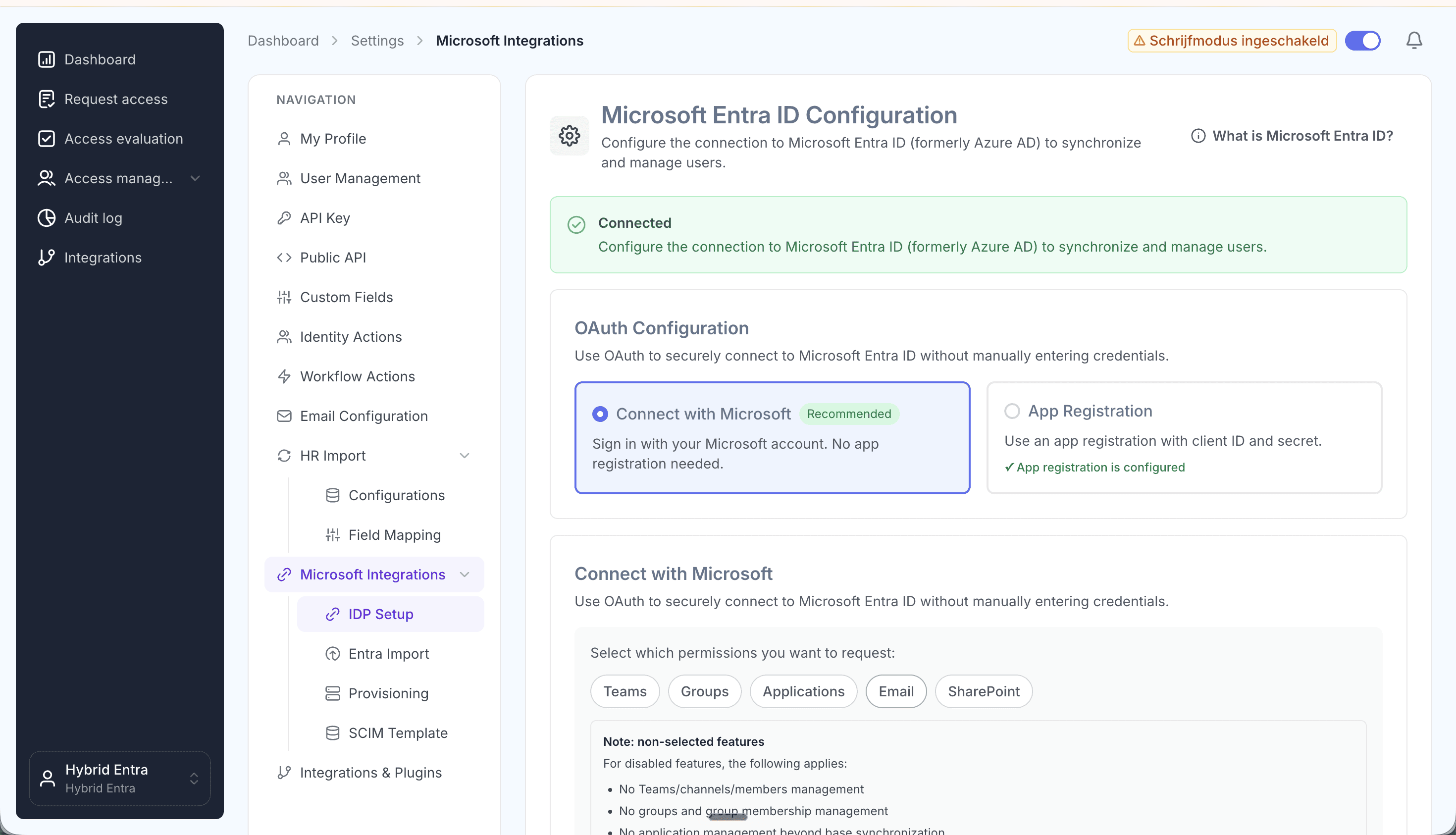
Connect your Microsoft tenant and pick your scopes.
3. Import your existing accounts from Entra ID
Import all existing accounts from Entra ID at platform.joinly.app/settings/provisioning/entra-import. This gives Joinly a baseline of every account that already exists, so it can match people to their current account instead of creating duplicates.
4. Find the Dayforce integration in the Joinly marketplace
Open the Joinly marketplace and search for the Dayforce integration.
Don't see your system listed? Get in touch at support@koppelhet.nl and we'll help you out.
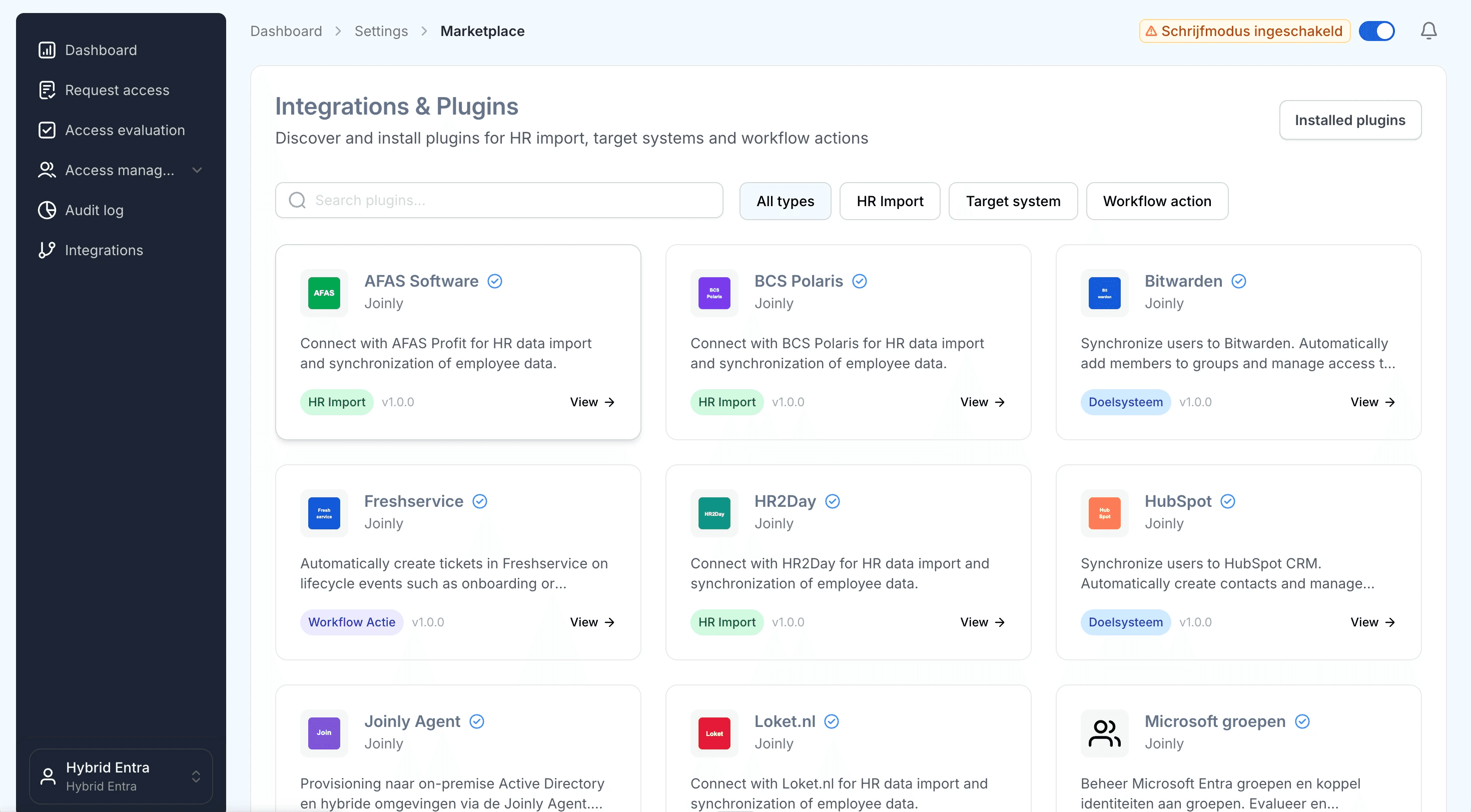
Search the marketplace for the Dayforce integration.
5. Follow the installation wizard
You may be redirected to integrations.joinly.app. Create an account there and enter your Dayforce connection details: your Dayforce Web Services URL (company instance endpoint), company ID, and OAuth credentials from the Dayforce developer portal. We only ask for the information needed to establish a successful connection with Dayforce. All data is encrypted and stored securely.
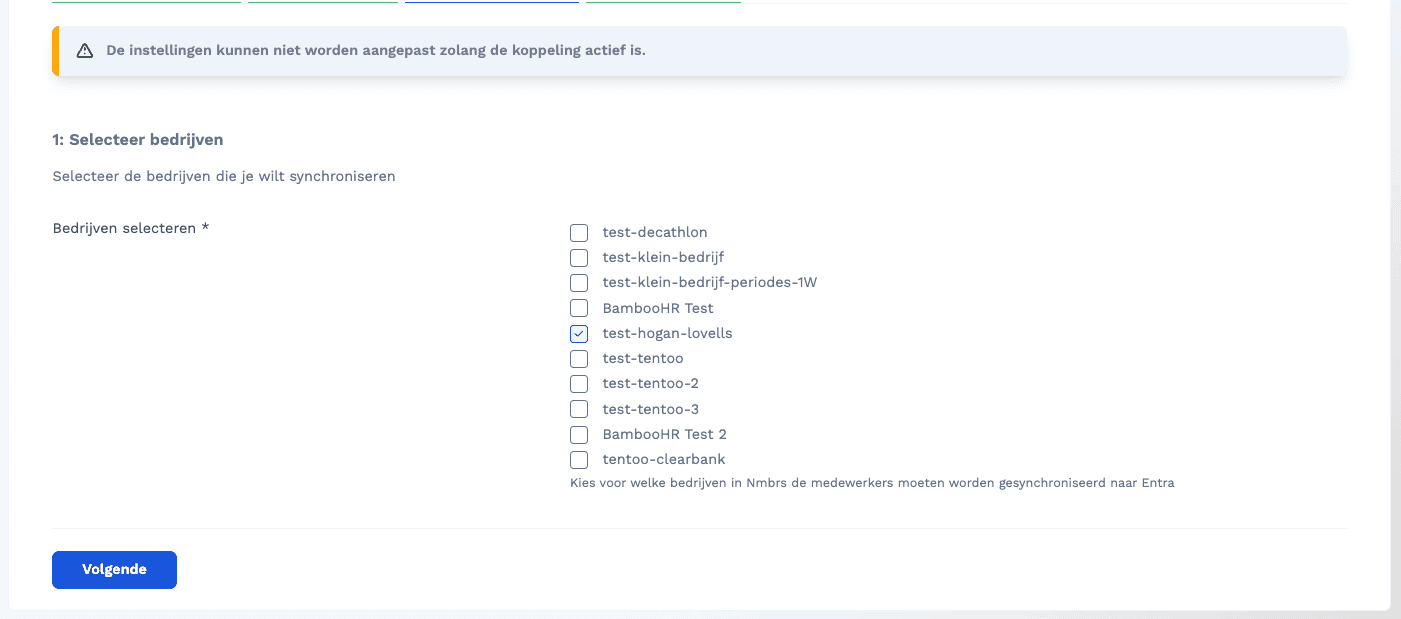
Enter your Dayforce Web Services endpoint, company ID and OAuth credentials in the wizard.
6. Configure your field mapping
Set up all your field mappings here. Templates support Liquid, so you can build your display name, UPN and other attributes dynamically from Dayforce fields.
Frequently asked questions
How do I map the manager? Reference the manager's Dayforce XRefCode in the mapping and Joinly resolves the link to the right manager automatically.
How do I handle XRefCode lookups? Joinly resolves department, position, location and pay group XRefCodes from the live tenant, so you map on the human-readable value and Joinly keeps the codes in sync.
How do I prevent duplicate usernames? Use the
generateUniqueUsernamehelper, which falls back to the next pattern when the first one is already taken:{{ generateUniqueUsername: "{firstName}.{prefix}.{lastName}", "{initials}.{prefix}.{lastName}" }}
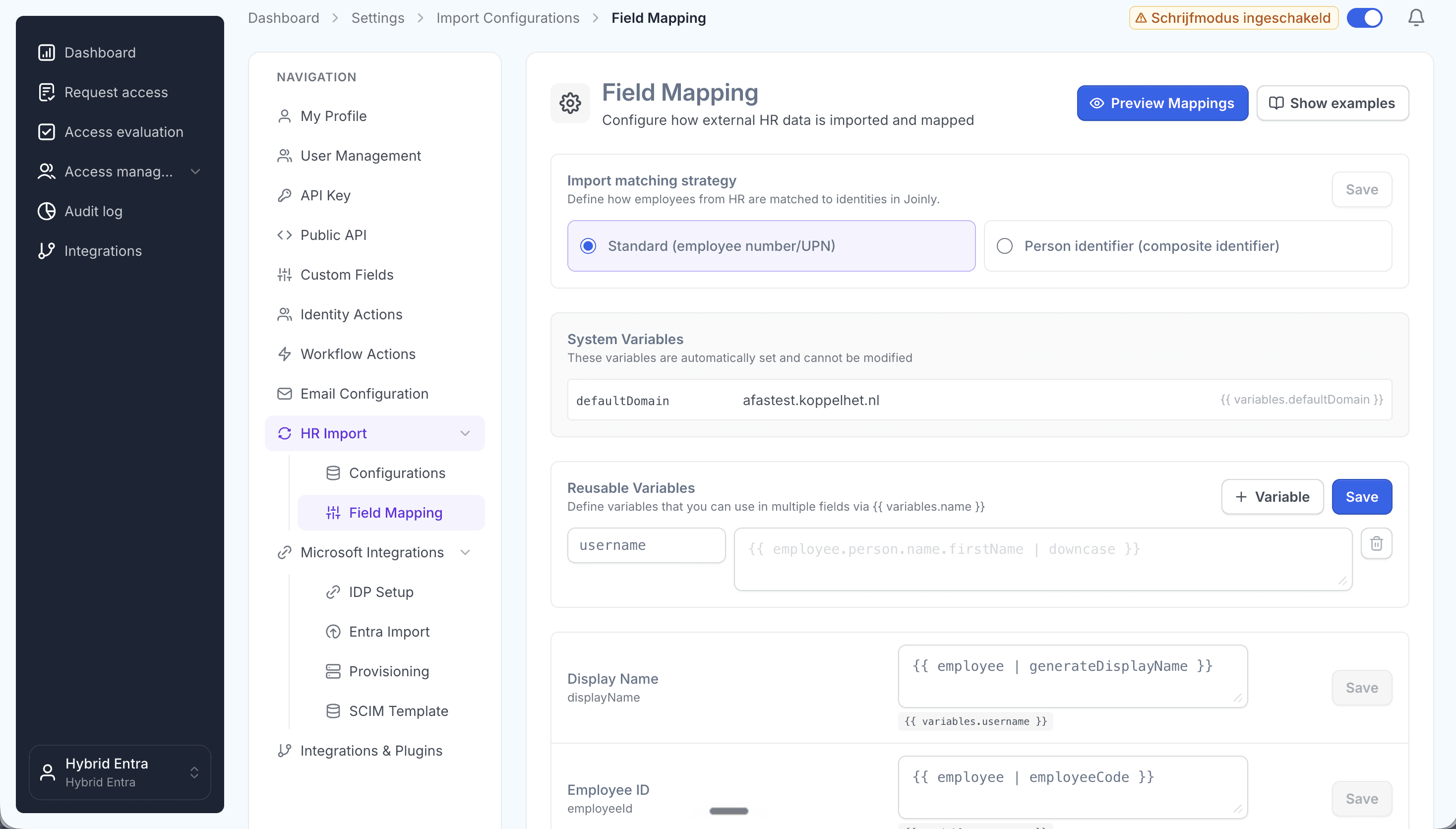
Map Dayforce fields to Entra ID attributes with Liquid templates.
7. Configure the scheduled import
At platform.joinly.app/settings/import-configs, configure how often the import from Dayforce should run.
8. Configure your workflows
Workflows are where Joinly turns each HR change into the right action in Entra ID. Create an onboarding (joiner) and offboarding (leaver) workflow with trigger-based execution, then an Identity updated workflow with a Create/update employee in Entra action so every change in Dayforce flows straight through to Entra ID. Finally, add a threshold workflow with the Entra soft delete action that runs a set period after the termination date (for example 30 days) to retire accounts safely.
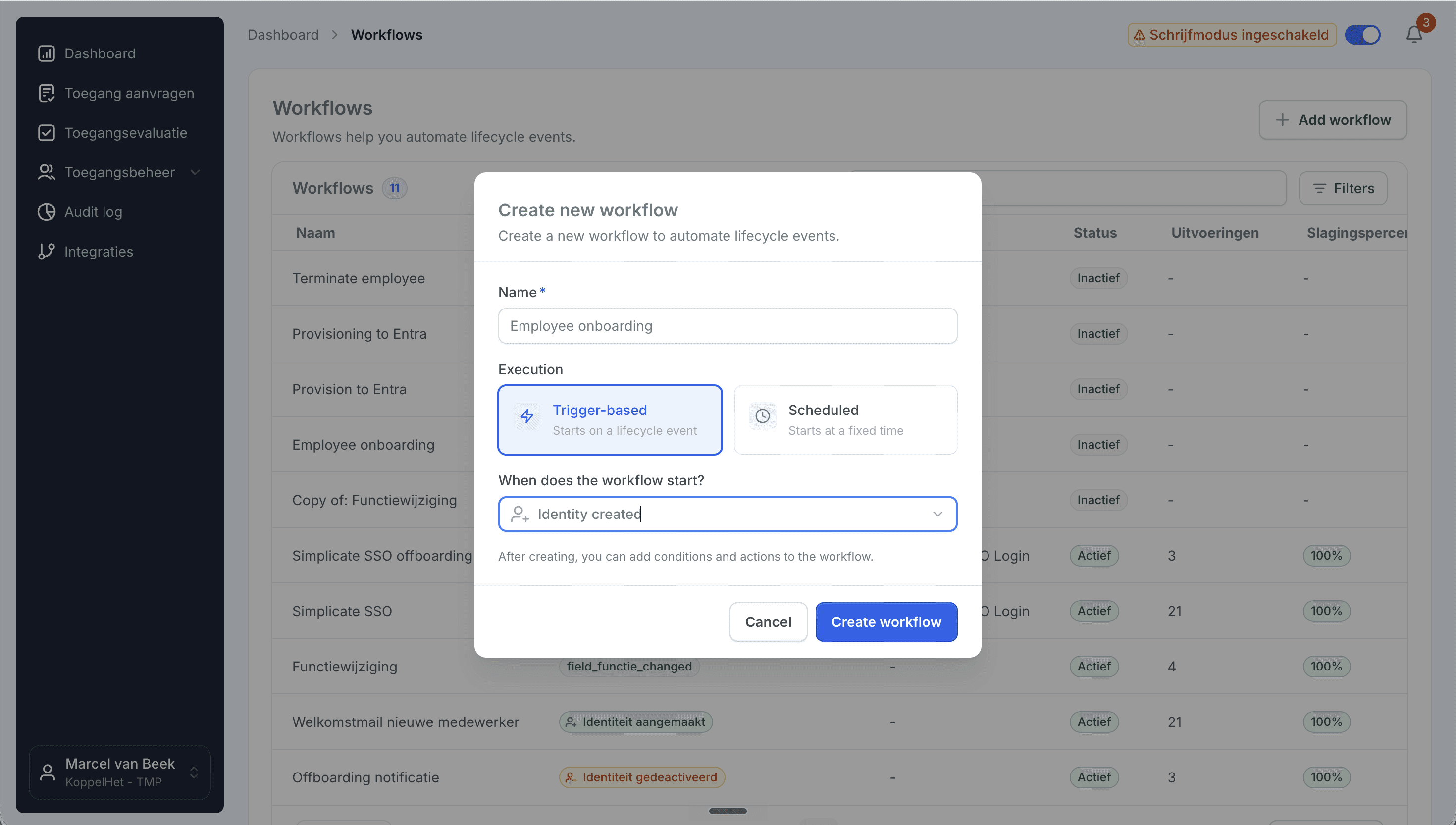
Create a trigger-based onboarding workflow.
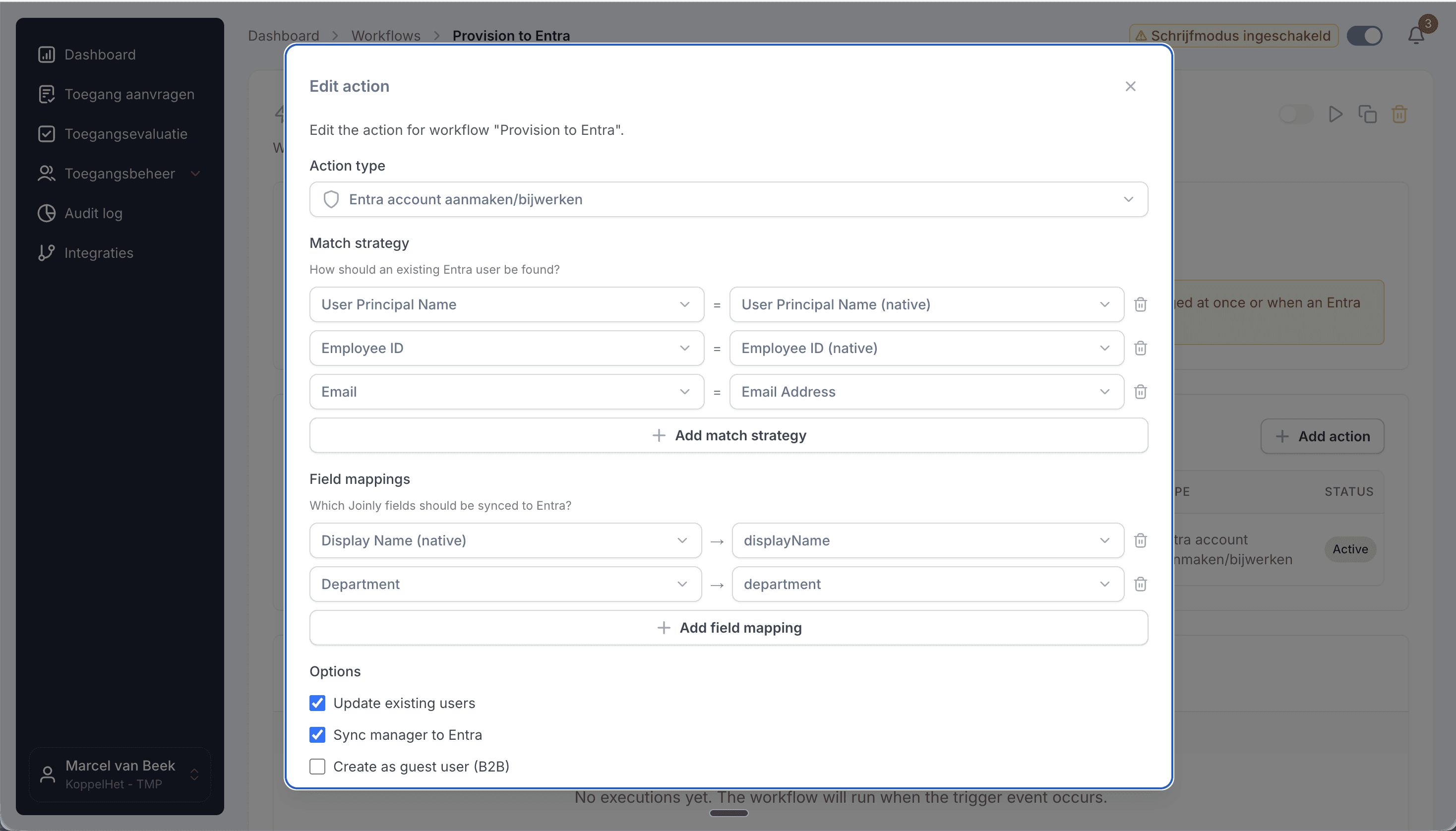
Add the create/update action, then set your matching strategy and field mapping.
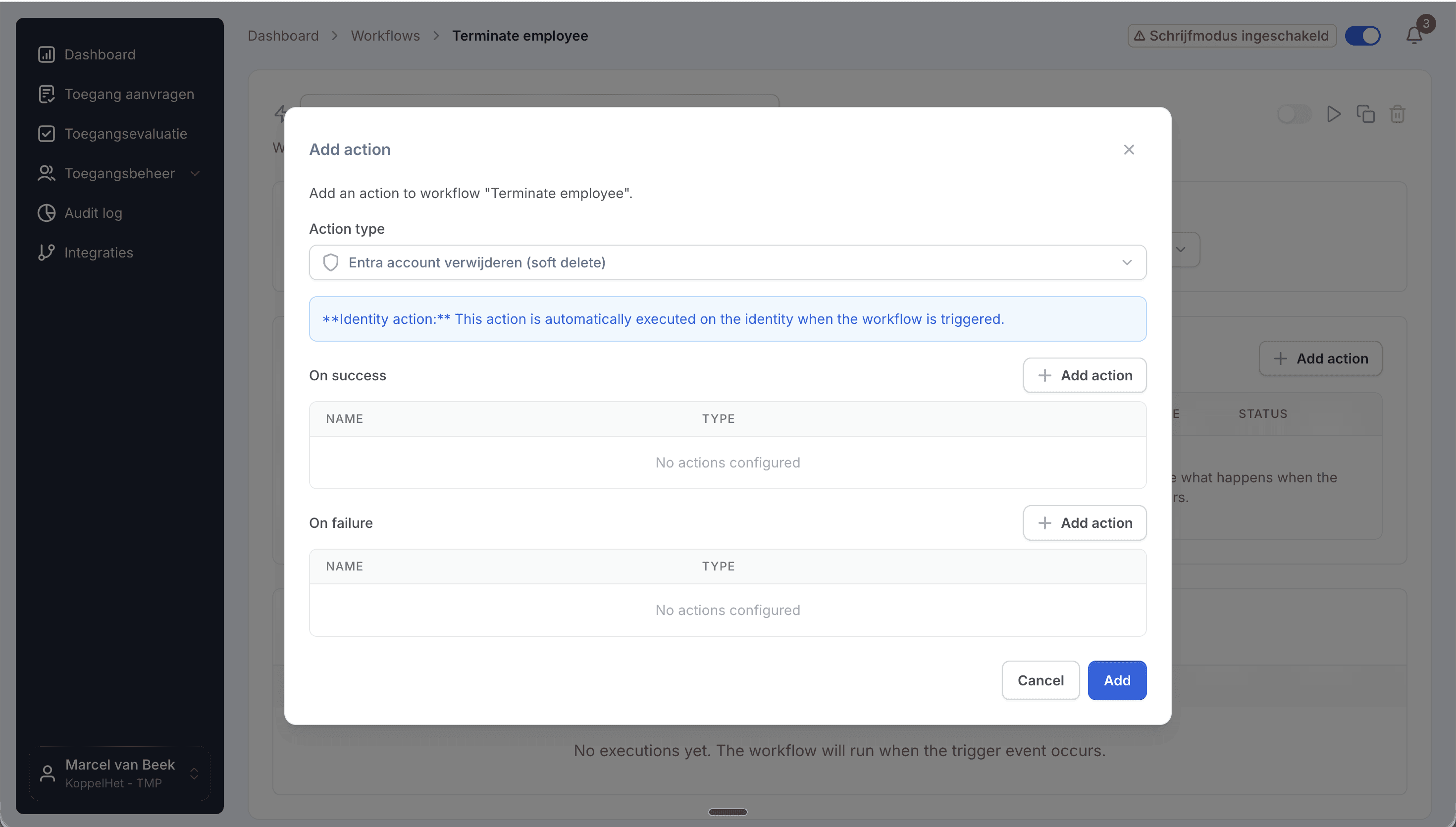
Add the Entra soft delete action to retire accounts safely.
AD on-premise support
Need to provision to an on-premise Active Directory as well? See our dedicated guide on connecting Dayforce to Active Directory, or contact support at support@koppelhet.nl to request setup of the Joinly AD Agent.
Frequently asked questions
Does the Dayforce to Microsoft Entra ID connection work in real time?
It runs as a frequent sync that updates multiple times per day, so changes in Dayforce reach Entra ID quickly without waiting for a nightly batch.
How does Joinly handle Dayforce XRefCodes?
Joinly resolves the XRefCodes for department, position, location and pay group from the live Dayforce tenant before it acts, so you map on the human-readable value and an invalid code never fails the sync with a silent 400.
How are future-dated hires handled?
Joinly reads the hire or work-assignment date on the Dayforce record and times account creation to it, so access is ready on the start date rather than the moment HR saved the record.
Which attributes sync from Dayforce to Entra ID?
Name, email / UPN, department, job, position, manager, location, legal entity, pay group, and hire and termination date. Additional Dayforce fields can be mapped via Liquid templates.
Do I still need the Aquera connector or Entra API-driven provisioning?
No. Joinly takes over the provisioning, role-to-group mapping, XRefCode resolution and termination-to-deprovisioning that the middleware does manually or not at all, and maintains it as your Dayforce data changes.
Does Joinly also support AD on-premise or hybrid provisioning?
Yes. Joinly has its own AD on-premise agent and also supports the native Microsoft Entra provisioning agent, so you can provision users to your on-premise AD environment as well. See the Dayforce to Active Directory guide.
More than a connector
A standalone Dayforce to Entra ID connection is a good start, but identity rarely stops at one target. Joinly manages the complete chain from joiner to leaver across all your systems, with logging and governance built in. You review the exceptions; Joinly maintains the chain.
Request installation support
Other guides
Frequently asked
Questions about connecting Dayforce to Microsoft Entra ID
How does Joinly connect Dayforce to Microsoft Entra ID?
The connection reads HR changes at the source (Dayforce REST API → Entra ID.) Authentication: OAuth 2.0 via the Dayforce developer portal. Joinly writes to Entra ID through Microsoft Graph, with its own app registration and application permissions — no synchronisation server, agent or extra infrastructure. If you prefer Microsoft's API-driven provisioning endpoint, Joinly can deliver the same changes as a SCIM 2.0 bulk request instead.
Which HR events does the Dayforce → Entra ID connection handle?
Joiner, mover, leaver (incl. rehire, status change, future-dated work assignment). Each event runs the workflow you configured for it: a joiner gets an account, groups and licences before the start date, a mover has the access of the old position removed and the new one added, and a leaver is disabled on the termination date.
Which Dayforce attributes are synced to Entra ID?
Name, email / UPN, department, job, position, manager, location, legal entity, pay group, hire and termination date. The mapping is configurable per field with Liquid templates, so your own naming convention for the user principal name, display name and e-mail address keeps applying.
How often does Joinly sync Dayforce with Entra ID?
Frequent sync, multiple times per day. The import schedule is yours to set — hourly, daily or weekly at a fixed time — and every run only processes what changed since the previous one.
Will Joinly overwrite the accounts that already exist in Entra ID?
No. Joinly first imports your existing directory and matches those accounts to the employees from Dayforce. Existing accounts are recognised and adopted rather than created twice. Which matching strategy applies — user principal name, e-mail address, employee ID or a person identifier — is a setting.
Can I try this without anything being written?
Yes. Run the import as a dry run and you get an Excel export of exactly what would happen. You can also leave the connection in read-only mode, where Joinly calculates everything but writes nothing, and set thresholds for how many creations, activations and deactivations one run may produce before it is blocked for approval.
Is Dayforce a ready-made connector in Joinly?
Yes. Dayforce is a ready-made HR connector in Joinly: you enable it, enter the details of your Dayforce environment and Joinly reads the employees from there. Nothing has to be developed on either side.
What happens when someone has more than one contract in Dayforce?
Joinly recognises that it is one person and decides which employment leads for the account, the manager and the department. You do not get two accounts for the same employee, and when one contract ends the account is only disabled when the last active employment ends.
Do I need a Microsoft Entra ID P1 or P2 licence for this?
Not for the Microsoft Graph path: Joinly uses its own app registration and the permissions you grant it. Microsoft's API-driven inbound provisioning endpoint, which Joinly can also target with SCIM bulk requests, follows Microsoft's own licensing for that feature.
Does the Dayforce → Entra ID connection support NIS2 and ISO 27001?
ISO 27001, NIS2-ready, GDPR (EU data centre). Every mutation lands in the audit log with its source — HR import, manual, from Entra, by the system or through an API key — and a link to the workflow that caused it. That is the evidence an auditor asks for when they want to know who had access to what, and why.
More on Dayforce
Everything Joinly publishes about Dayforce: the other installation guide, how the connection compares with Microsoft's own provisioning, what offboarding looks like, and the SCIM route.
See what Joinly can do for your organisation?
Start a free trial today or get in touch for advice on your HR and Microsoft environment.