Joinly by KoppelHet

Entra ID and Active Directory

API-driven inbound provisioning: connecting HR to Entra ID without creating accounts by hand

HR enters a new employee and shortly afterwards the account is in Microsoft Entra ID. That is the idea behind API-driven inbound provisioning. Microsoft handles the processing in Entra ID, but the connection with your HR system does not build itself. What do you need to arrange for it, and what can you hand over?

From HR data to a Microsoft account, without separate scripts per user

The technology sounds complicated, but the idea is straightforward: you supply the right employee data and Microsoft processes the changes into accounts.

Microsoft has ready-made inbound connections for Workday and SuccessFactors. For any other system of record there is API-driven inbound provisioning: an HR package, a payroll system, an Excel export or a SQL table. The idea is simple. You supply the data, Microsoft does the rest: comparing it with what is in the directory, applying the attribute mapping, and creating, updating, enabling or disabling the account. Where this route fits in the whole picture is covered in provisioning in Entra ID.

The main difference from the ordinary Microsoft Graph Users API: you send the state from the source, without saying whether it is a create or an update. The provisioning service decides for itself which action is needed, processes the request asynchronously and follows the mapping and scoping filters the administrator sets in the Entra admin center.

To Microsoft Entra IDTo on-premises Active Directory
App in the galleryAPI-driven inbound user provisioning to Microsoft Entra IDAPI-driven inbound user provisioning to on-premises AD
For whomCloud-only accountsHybrid accounts, which then reach Entra ID through the sync
What you needApplication Administrator roleApplication Administrator plus Hybrid Identity Administrator, and a Windows server for the Microsoft Entra provisioning agent
Where the account landsIn Entra IDIn the OU you set

What do you need and how much can you process?

Before you start, it is good to know which licences and technical limits apply to your organisation.

API-driven provisioning is included in Entra ID P1, P2 and Entra ID Governance, with a licence for every identity you bring in through the API. The licence also determines how much you may send per day:

Entra ID P1 or P2With Entra ID Governance
Calls per 24 hours (per tenant)2,0006,000
Records per 24 hours (at 50 per call)100,000300,000
Provisioning apps per flow2 to AD and 2 to Entra ID20 to AD and 20 to Entra ID
  • Up to 50 operations per call. Each operation is one employee.
  • Up to 40 calls within five seconds. Above that you get HTTP 429 (Too Many Requests). Build in a pause between your requests.
  • If you exceed the daily quota, you also get 429. So do not put ten records in a call when it could be fifty.

Setting up the connection in Entra ID

You do most of the setup once. After that the process runs in the background, provided the supply from HR is well arranged.

  1. In the Entra admin center, go to Entra ID, Enterprise apps, New application, search for "API-driven" and choose the app for Entra ID or for AD. Give it a name that says which source it is, for example Provision-Medewerkers-HR-naar-AD.
  2. Open Provisioning, choose Get started and set the mode to Automatic. Save.
  3. For AD: download the Microsoft Entra provisioning agent from the notification, install it on a Windows server in your domain, then choose your domain and the OU where new accounts go, and test the connection.
  4. Enter a notification address under Settings. This is required: without an address the connection goes into quarantine as soon as it starts.
  5. Under Settings, also turn on Prevent accidental deletions, with a threshold that suits your organisation.
  6. Check the attribute mappings. By default the app recognises an existing user by comparing externalId from your request with employeeId in the directory. Change that if your employee number is stored somewhere else.
  7. Choose Start provisioning. The job is then listening. Under Statistics to date, View technical information, copy the Provisioning API Endpoint.
  8. Give your API client (an app registration or managed identity) the application permissions SynchronizationData-User.Upload and ProvisioningLog.Read.All, with admin consent.

What a message with employee data looks like

Under the bonnet, Microsoft expects a fixed format. Below you can see how such a message is built.

The endpoint only accepts POST, with Content-Type: application/scim+json. If that header is missing, you get 400 Bad Request; that is the most common error. The body is a SCIM BulkRequest with one operation per employee. The fields come from the SCIM Core User schema and the Enterprise User extension. For fields of your own, such as a cost centre or job code, you extend the app's schema.

One new employee and one transfer in a single request
POST https://graph.microsoft.com/v1.0/servicePrincipals/{servicePrincipalId}/synchronization/jobs/{jobId}/bulkUpload
Authorization: Bearer {token}
Content-Type: application/scim+json

{
  "schemas": ["urn:ietf:params:scim:api:messages:2.0:BulkRequest"],
  "Operations": [
    {
      "method": "POST",
      "bulkId": "100482",
      "path": "/Users",
      "data": {
        "schemas": ["urn:ietf:params:scim:schemas:core:2.0:User",
                    "urn:ietf:params:scim:schemas:extension:enterprise:2.0:User"],
        "externalId": "100482",
        "userName": "jan.jansen@bedrijf.nl",
        "name": { "givenName": "Jan", "familyName": "Jansen" },
        "displayName": "Jan Jansen",
        "title": "Medewerker crediteuren",
        "active": true,
        "urn:ietf:params:scim:schemas:extension:enterprise:2.0:User": {
          "employeeNumber": "100482",
          "department": "Financiële administratie",
          "manager": { "value": "100017" }
        }
      }
    },
    {
      "method": "POST",
      "bulkId": "100233",
      "path": "/Users",
      "data": {
        "schemas": ["urn:ietf:params:scim:schemas:core:2.0:User",
                    "urn:ietf:params:scim:schemas:extension:enterprise:2.0:User"],
        "externalId": "100233",
        "active": true,
        "urn:ietf:params:scim:schemas:extension:enterprise:2.0:User": {
          "department": "Inkoop"
        }
      }
    }
  ],
  "failOnErrors": null
}
  • `manager.value` is the manager's externalId, not their email address. The provisioning service looks them up itself.
  • `active: false` disables the account. That is how you process a leaver.
  • Send the complete record, even for a small change. If you turn on "clear attribute values" (preview), a field you leave out can clear an existing value. The second record above is only safe as long as that setting is off.
  • The response is 202 Accepted, with a Location header that points to the provisioning logs of this job. 202 means the request has been received, not that the accounts already exist.
Sending and fetching the outcome with Microsoft Graph PowerShell, as an app
Connect-MgGraph -ClientId $appId -TenantId $tenantId -CertificateThumbprint $thumbprint

$uri  = "https://graph.microsoft.com/v1.0/servicePrincipals/$spId/synchronization/jobs/$jobId/bulkUpload"
$body = Get-Content .\bulkrequest.json -Raw

Invoke-MgGraphRequest -Method POST -Uri $uri -Body $body -ContentType "application/scim+json"

# A little later: what happened to each record?
Get-MgAuditLogProvisioning -Filter "jobid eq '$jobId'" -Top 50 |
  Select-Object ActivityDateTime, ProvisioningAction,
    @{ n = "Status"; e = { $_.ProvisioningStatusInfo.Status } },
    @{ n = "Fout";   e = { $_.ProvisioningStatusInfo.ErrorInformation.Reason } }

Where it goes wrong

What you seeCauseWhat you do
400 Bad RequestUsually Content-Type: application/scim+json is missing, or the body does not fit the schema.Set the header and check the JSON against the SCIM schema.
403 ForbiddenThe client lacks SynchronizationData-User.Upload, or in a delegated session the user is not a User Administrator.Grant the permission with admin consent.
429 Too Many RequestsMore than 40 calls within five seconds, or the daily quota has run out.Wait between calls and put 50 records in each request.
Create fails on the UPNThe generated UPN already exists. The provisioning service does not resolve duplicate UPNs.Make the UPN unique in your client, or use RandomString (Entra ID) or SelectUniqueValue (AD) in the mapping, on create only.
A second account for the same personThe matching attribute is wrong, for example an empty employeeId on the existing account.Fill in the employee number on existing accounts before you start.
The job is in quarantineNo notification address, too many errors, or the accidental deletions threshold has been hit.Read the reason on the provisioning page; for the threshold, choose Allow deletes or look for the cause in the logs.

What Microsoft arranges and what you still have to organise yourself

Microsoft can process accounts, but it does not automatically fetch data from every HR package. That is exactly the part that determines how much management work you are left with.

Microsoft provides the endpoint and the processing. Everything before that is up to you. If you choose this route, you build and maintain a connection of your own:

  • Fetching from HR: an export, an API or a database, with the vendor's authentication and changes.
  • Converting to SCIM: which HR fields go to which SCIM attributes, dates in the right format, country codes, empty fields, the manager as externalId.
  • Scheduling: when the connection runs, in batches of 50, with pauses for the limit, and what happens if a run stops halfway.
  • Error handling: reading the provisioning logs, resubmitting records that failed, and alerting someone if it keeps failing.
  • A check up front: Microsoft's threshold counts disables and deletions per cycle. An export that would suddenly create hundreds of new accounts, or fills a field wrongly, is something you catch yourself before you send.
  • Deleting: the endpoint deletes nothing. If you want to clean up accounts after a retention period, you arrange that separately, for example with the Delete user task in Lifecycle Workflows.
  • The way back: this API cannot write the email address or username back to HR. That is a separate connection.

For one source and a stable export that is doable, and Microsoft has examples with PowerShell and Logic Apps. The maintenance remains: every change in the HR package, every new field and every new operating company ends up in your script.

Joinly

Using Microsoft's technology without building the whole connection yourself

API-driven provisioning is a good foundation, but you still have to fetch data from HR, convert it, send it and check it. And you do not want one wrong HR export to simply disable dozens of accounts.

Joinly takes care of the connection with HR and can deliver the data to Microsoft's provisioning route. You also get the means to check changes in advance, flag anomalies and see the processing afterwards. That way you use what Entra ID can do, without having to maintain a complete HR integration yourself.

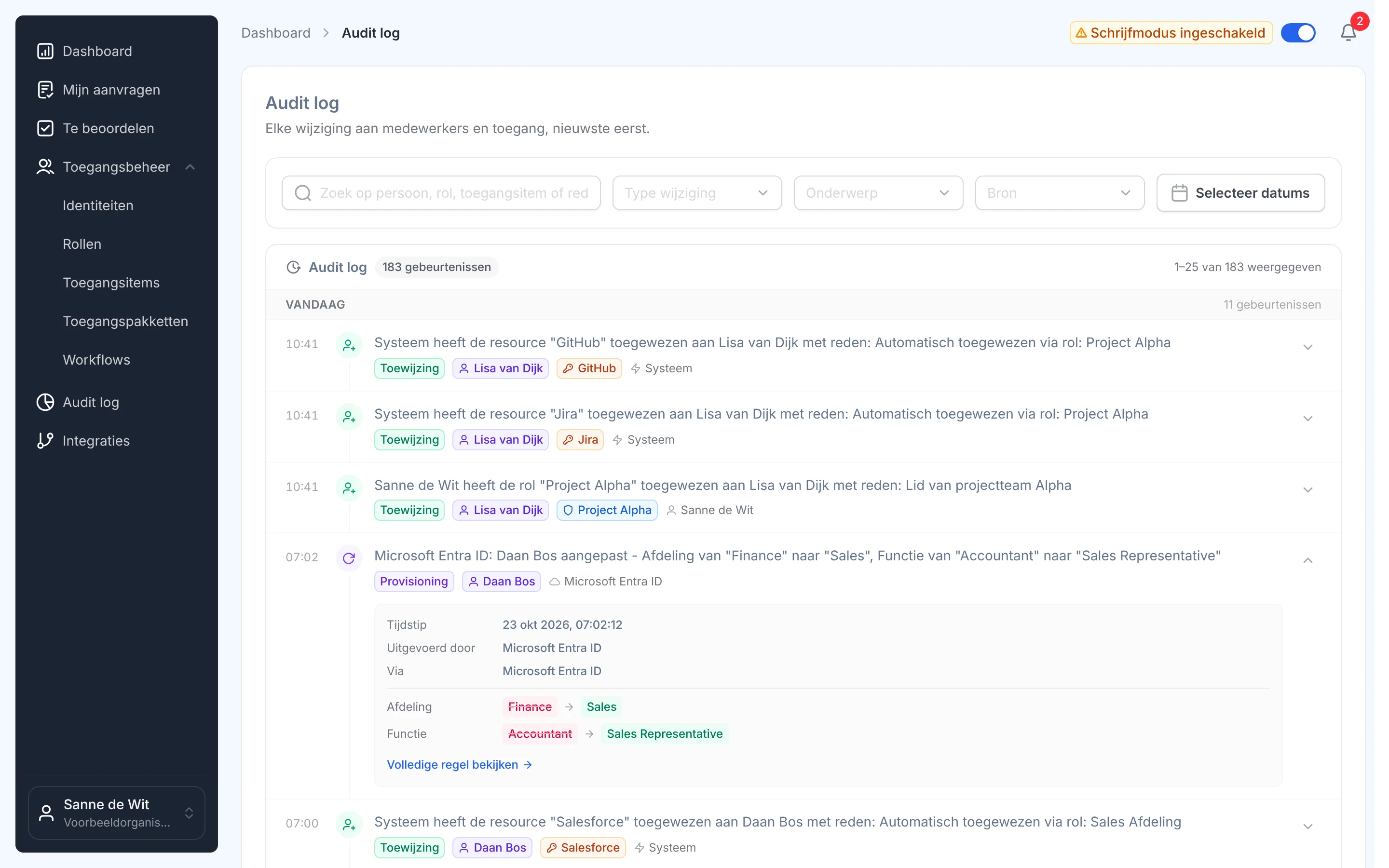
Het auditlog in Joinly: elke wijziging aan identiteiten en toegang, met wie het deed en waaromSee Joinly's SCIM gateway

What you can count on

  • No vendor lock-inYour identities and your configuration stay yours.
  • Your data out whenever you wantYou can export your data at any time.
  • Standard SLAOur standard SLA is available on request.
  • Support during implementationOur specialists set it up together with you.
  • ISO 27001 certifiedInformation security to an internationally recognised standard.

API-driven inbound provisioning

Frequently asked questions

  • Which licence do I need for API-driven provisioning?

    Entra ID P1, P2 or Entra ID Governance, with a licence for every identity you bring in through the API. With P1 or P2 you may make 2,000 calls per 24 hours, with Governance 6,000.

  • Is the bulkUpload endpoint an ordinary SCIM endpoint?

    No. It uses the SCIM schema in the request, but it only knows POST. You send the state from the source, and the provisioning service decides for itself whether an account is created, updated, enabled or disabled.

  • Can I create accounts in Active Directory with API-driven provisioning?

    Yes. Choose the app for on-premises AD and install the Microsoft Entra provisioning agent on a Windows server in your domain. The accounts land in the OU you set, and then reach Entra ID through your sync.

  • How many employees can I send per call?

    Up to 50 per call, and up to 40 calls within five seconds. Above that you get HTTP 429.

  • Can I delete accounts through the API?

    No. With `active` set to `false` you disable an account. Deleting after a retention period is something you arrange separately, for example with the Delete user task in Lifecycle Workflows.

  • Do I have to build a connection myself to use this API?

    If you call it directly, yes: fetching from HR, converting to SCIM, scheduling and handling errors. Joinly uses the same route and provides that connection from your HR system, with a test import and a threshold up front.

Try Joinly on top of your own Microsoft environment

Roles, workflows, external staff and an audit log for Entra ID and Active Directory. Start with demo data in the free trial environment.

No credit card, nothing to install.

Rather talk to someone first? Talk to an IAM specialist