
Overig · Overig
One workflow, several moments: workflows that start on more than one trigger
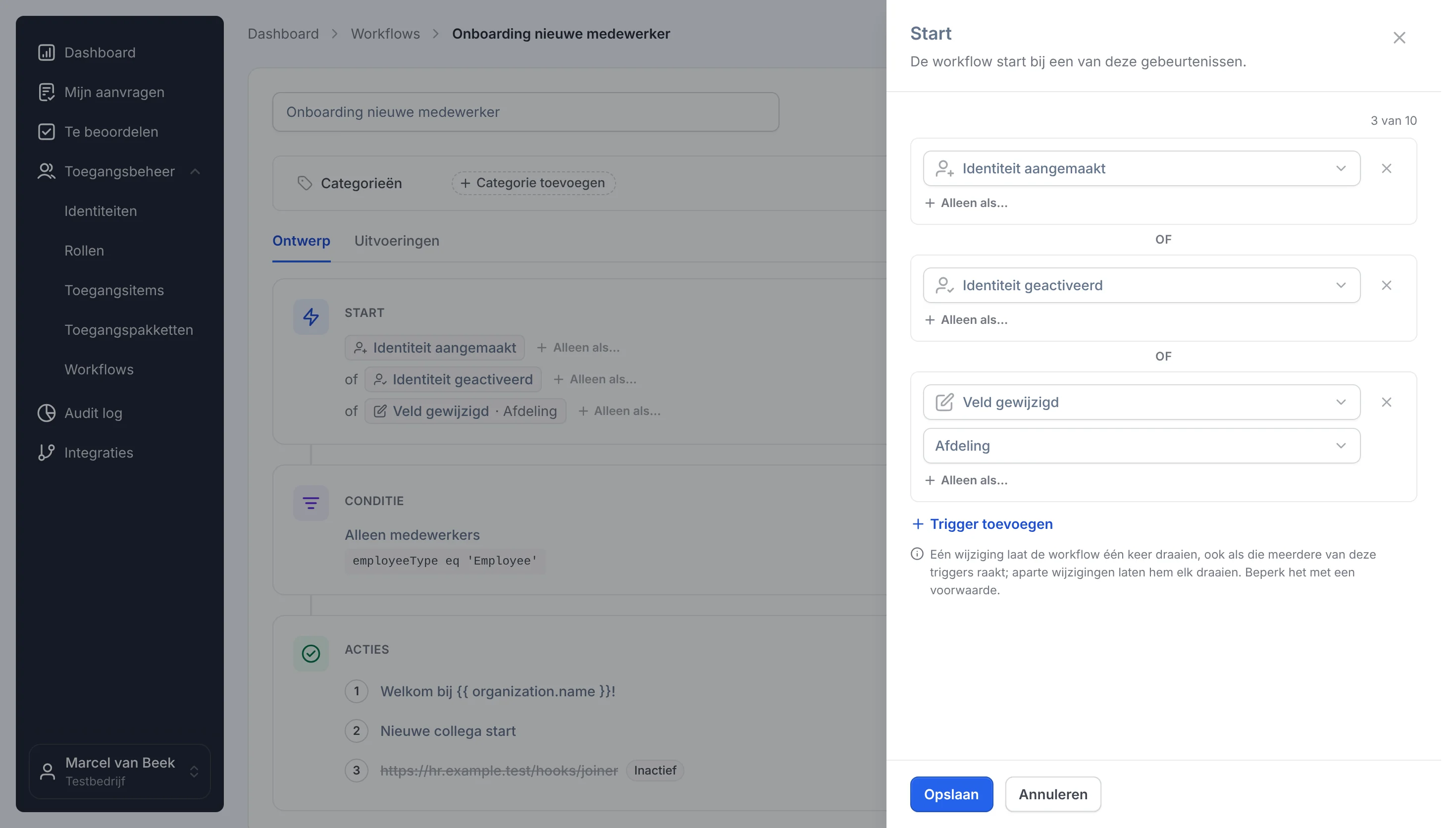
Created, activated or moved department: one workflow now starts at each of those moments, with a condition of its own per trigger.
Marcel van Beek · IAM Specialist · 3 min read
A new colleague comes in through HR. A week later their account is switched on, and two months later they move department. At all three moments the same has to happen: the right groups, a message to the manager, a ticket for the workplace. In many environments there are two or three workflows for that, with the same actions. Until someone changes one and forgets the rest.
One process, one workflow
In Joinly a workflow can now start on more than one event. You choose, for example, Identity created, Identity activated and Field changed on the department. The conditions and actions sit underneath once and apply to every moment. Change an action and it applies straight away wherever the process starts.
The workflow page reads top to bottom: under Start when the workflow begins, below that who it applies to and below that what it does. With Edit you add a trigger. The change goes live only when you save.
Each moment its own check
Sometimes each moment needs something different. A password reset should go out on an activated account only if the person already has an account in Entra ID, and after the sync with Entra only if their start date is close. For that you put a condition of its own under a trigger. It counts only for the runs that trigger starts, next to the workflow's own condition.
What you notice
- Fewer workflows to manage and check, and no copies drifting apart.
- The overview shows straight away which workflows have more than one trigger, for example Identity created +2.
- Every run shows which trigger started it. In an audit you explain at a glance why a workflow ran.
- When one change sets off several triggers at once, such as a new employee who is active straight away, the workflow runs once. No second welcome email.
Three examples
- Onboarding that keeps up. Created, activated and a change of department. Groups, message and ticket follow the person.
- Offboarding that misses nobody. A deactivated account or an end date that passes. Whichever comes first starts the clean-up.
- A password reset at the right moment. Activation and the sync with Entra, each with a condition of its own.
Getting started
Do you have two workflows that do the same thing? Open the one you keep, add the other one's trigger under Start and switch the spare one off. A workflow can have up to ten triggers. Existing workflows do not change until you add a trigger to them. More about workflows is on workflows.
Explore more blogs

Segregation of Duties (SoD): wat het is en hoe je het afdwingt
Wat is segregation of duties (functiescheiding)? Uitleg, voorbeelden en waarom het vaak misgaat. Plus hoe je SoD-conflicten automatisch tegenhoudt.
Marcel van Beek · 4 min read

How do you apply AGDLP in a hybrid Entra/AD environment? (And why you shouldn't want to anymore)
Short answer: preferably not. AGDLP (Accounts → Global groups → Domain Local groups → Permissions) is a concept from the era of manual management. The entire nesting construction exists for one reason: to allow a human to assign permissions with as few mouse clicks as possible. As soon as an agent assigns group memberships directly based on HR data, this reason disappears and only the complexity remains. Moreover, in a hybrid environment, this complexity actively works against you, because Entra ID completely ignores nesting for licences and app assignment. In this article, you can read how AGDLP works and why it was once smart, where it breaks down in a hybrid environment, and what the modern alternative looks like: direct memberships, managed by automation.
Marcel van Beek · 5 min read

How do I set up role-based access control (RBAC) and least privilege for a municipality?
Start with the roles in your HR system and map them to roles, not to individual permissions per person. Group each role with precisely the access required for the job, adhering to the principle of least privilege. Manage these roles centrally and let an orchestration layer automatically assign and revoke them. This keeps access predictable, limited and demonstrable.
Mike Fraanje · 4 min read
See what Joinly can do for your organisation?
Start a free trial today or get in touch for advice on your HR and Microsoft environment.
No credit card, nothing to install.