
INAZ → Microsoft Entra ID (formerly Azure AD)
Connect INAZ to Microsoft Entra ID
When someone joins, moves or leaves in INAZ, you want that change reflected in Microsoft Entra ID without anyone touching it by hand. To connect INAZ to Microsoft Entra ID, Joinly reads each HR change in HR Inaz at the source — over whichever export or data channel your INAZ deployment provides — and applies it automatically to the right account. INAZ stays your source of truth; Joinly is the engine that keeps every action accurate and traceable.
Key takeaways
HR Inaz stays your source of truth; Joinly applies every joiner, mover and leaver to Entra ID automatically.
Joinly maps INAZ structures — the organization chart, cost centres, function charts and the employee dossier — to the right Entra ID groups and licences, which no INAZ-native Entra connector does for you.
There is no out-of-the-box INAZ-to-Entra connector, so today most teams either build a custom file feed or hand-process a list; Joinly turns the INAZ export into automated, rule-based provisioning.
Joinly adapts to how your INAZ is deployed — on-premise user licence, SaaS/ASP/Cloud, or BPO — reading the structured export, database or middleware feed your instance exposes.
Every action is logged for a complete audit trail, aligned with NIS2 and ISO 27001, with data kept in the EU.


Quick facts
Source system | INAZ (HR Inaz) |
Target system | Microsoft Entra ID (formerly Azure AD) |
Connection method | INAZ HR export (structured file / record path, database or middleware) → Joinly → Entra ID |
Supported events | Joiner, mover, leaver (incl. rehire and internal transfer) |
Synced attributes | Name, email / UPN, department, job title, manager, cost centre, organisational unit, start and end date |
Authentication | Secured connection to the export/feed your INAZ deployment exposes; credentials encrypted at rest |
Real-time or batch | Frequent sync, multiple times per day |
Compliance | ISO 27001, NIS2-ready, GDPR (EU data centre) |
Liever in het Nederlands? INAZ koppelen met Microsoft Entra ID
How does Joinly sync INAZ to Microsoft Entra ID?
Joinly reads each HR change in HR Inaz through the export or data channel your deployment provides and applies it to the matching Entra ID account automatically. INAZ holds the authoritative employee dossier, so it is the starting point for each identity action.
Joiner. HR completes the hire in HR Inaz. Joinly reads the new resource’s dossier and determines the role from attributes like department, job title and cost centre. It then creates the account in Entra ID, assigns the right licences and maps the person into the correct groups — timed to the start date recorded in INAZ.
Mover. When someone changes position, department or cost centre in INAZ, Joinly updates their group membership, permissions and licences to match. Access that no longer fits the new position is revoked, so permissions stay aligned with the actual job.
Leaver. On the end date recorded in INAZ, Joinly disables the Entra ID account automatically. There are no orphaned accounts left active after someone has left, and a soft-delete grace window lets you recover an account if a leaver is rehired.
Example: An Italian company with several legal entities hires a customer-service agent in HR Inaz with a start date next Monday, assigned to a cost centre in its Milan office. Joinly reads the dossier, waits until the start date, creates the Entra ID account, assigns an Office E3 licence and adds the agent to the IT-CustomerService group. When that agent later transfers to a different department, Joinly swaps the groups the same day and keeps the UPN stable.
What manual user management costs
Without automation, every account starts as an email from HR or a line in a spreadsheet exported from INAZ that IT works through by hand. Because there is no native INAZ-to-Entra connector, even a home-built file feed only copies attributes across — the part that actually decides access, role-to-group mapping and joiner/mover/leaver timing, still falls to people.
Onboarding delays. New joiners wait for accounts, licences and group access while a request sits in a queue, losing productive days in their first week.
Permissions that don’t keep up (privilege creep). When movers change position or cost centre, old access often stays attached, so people accumulate rights they no longer need.
Forgotten offboarding. Accounts that aren’t disabled on time are both a security and audit risk, and unused licences keep costing money — especially when the only trigger is a manual note from HR.
Joinly vs. a native / file-based Entra provisioning setup
INAZ has no dedicated Entra connector, so the realistic baseline is Microsoft’s own file-based inbound provisioning or a middleware feed. Both can move attributes across, but they stop short of the part that actually decides access. Here’s how the two compare for an INAZ-driven setup.
Joinly | Native / file-based Entra provisioning | |
|---|---|---|
Source | Reads the INAZ HR export directly, whatever the deployment | Needs a hand-built file or CSV feed; no INAZ template |
Role-to-group mapping | Built in, rule-based on org chart and cost centre | Manual expression mappings; no role-to-group out of the box |
Future-dated hires | Times account creation to the INAZ start date | Needs custom date-window configuration |
Deployment coverage | Adapts to on-premise, SaaS/ASP/Cloud or BPO INAZ | Assumes one stable feed format |
Licence assignment | Driven by role / attributes | Manual or group-based only |
On-premise AD | Yes, own agent plus the native Microsoft agent | Provisioning agent required, limited mapping |
Audit trail | Per-action logging tied to the HR source | Limited |
Watch-outs when connecting INAZ to Microsoft Entra ID
A few INAZ-specific details decide whether this connection stays reliable at scale.
No standard provisioning API. INAZ describes itself as ‘fully integrable’ and interfaces with common databases, but it does not publish a general-purpose provisioning API. Joinly connects on top of the export your instance exposes — a structured file / record path, a database feed or a middleware channel — and confirms the exact route during onboarding.
Deployment fragmentation. The same INAZ product ships as an on-premise user licence, as SaaS/ASP/Cloud, or as a fully outsourced BPO service, and the data path differs in each. Joinly is built to read whichever channel your deployment provides rather than assuming a single fixed format.
Mapping the organization chart and cost centres to Entra groups. The INAZ organization chart, function charts and cost centres don’t translate one-to-one to Entra ID groups. Joinly builds explicit mapping rules from those structures to the correct groups and licences, so role drives access rather than manual assignment.
UPN format with duplicate names. When two employees share a name, a naive UPN rule produces collisions. Joinly applies custom transformation rules — a suffix, a cost-centre code or a controlled tiebreaker — so every UPN is unique and predictable from day one.
Italian payroll fields. INAZ carries Italian-specific data such as CCNL contractual tables and the codice fiscale that you rarely want to push into Entra verbatim. Joinly maps only the attributes you need via Liquid templates, so the right fields land in the right place and the rest stay in INAZ.
Joinly handles each of these by default with custom mapping and transformation.
Always audit-ready
Every account action Joinly performs is logged: who was affected, when it happened, which access changed and which INAZ change triggered it. For NIS2 that matters directly: access can be traced back to an authorised HR source rather than an ad-hoc request. Joinly is ISO 27001 certified, runs in an EU data centre in Amsterdam, applies least-privilege by default, and is built to meet NIS2 and ISO 27001.
Example case
Picture a regional healthcare provider with around 2,600 employees across several sites in Italy, running HR Inaz as its HR core while identity provisioning never quite keeps up. There is no native INAZ-to-Entra connector, so a colleague exports a list from INAZ each week and IT works through it by hand — creating accounts, assigning licences, adding groups. With seasonal contracts and frequent internal transfers between wards and departments the list is always behind, and new clinical staff wait until day two or three for their account and access.
Connect INAZ to Microsoft Entra ID with Joinly and that work disappears. Joinly reads each HR change in HR Inaz at the source and acts on it automatically: new hires have their account, Office licence and group access ready on their start date, transfers between departments swap the right groups the same day, and leavers are disabled on their end date with a 30-day soft-delete grace window.
“We used to re-key an INAZ export into Entra every week and still fall behind. Now an account is simply ready on the start date, a transfer just swaps the access, and we can show the auditor exactly which INAZ change created every bit of access.” — Head of IT, regional healthcare provider
The outcome this setup is designed for: onboarding drops from days to zero touch, the weekly re-keying stops entirely, and the team can walk into its next NIS2 assessment with a complete, source-backed audit trail.
Installation guide
Follow these steps to connect INAZ to Microsoft Entra ID with Joinly. The entire cloud setup happens in the platform, with no scripts or local software required.
1. Create your account
Go to platform.joinly.app and create your account.
Note: charges may apply for using the platform after the trial period ends.
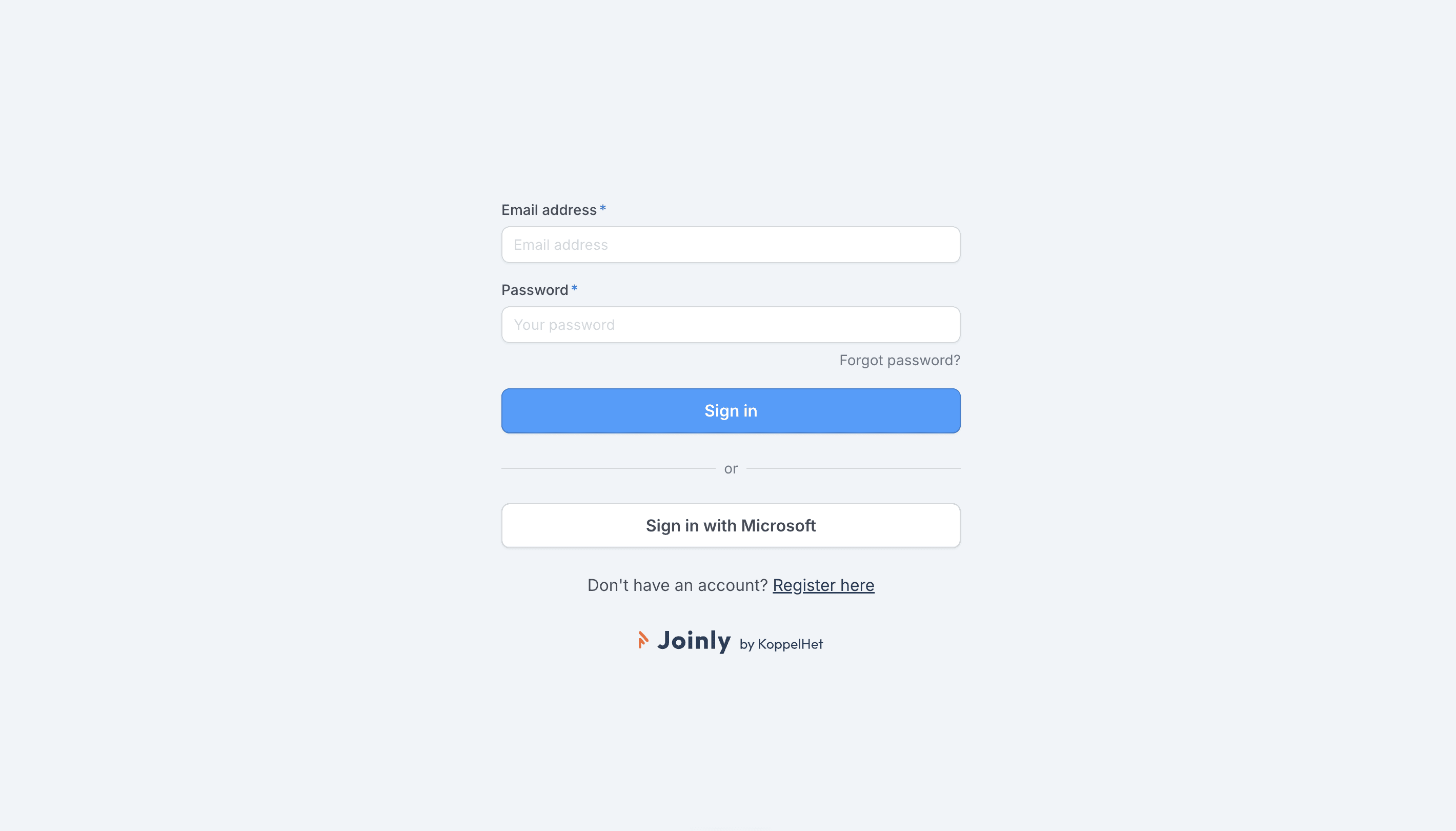
Sign up at platform.joinly.app to get started.
2. Connect your Microsoft account
Open platform.joinly.app/settings/provisioning/idp-setup and connect your Microsoft tenant. Select the scopes you need. For provisioning you don’t need any additional scopes.
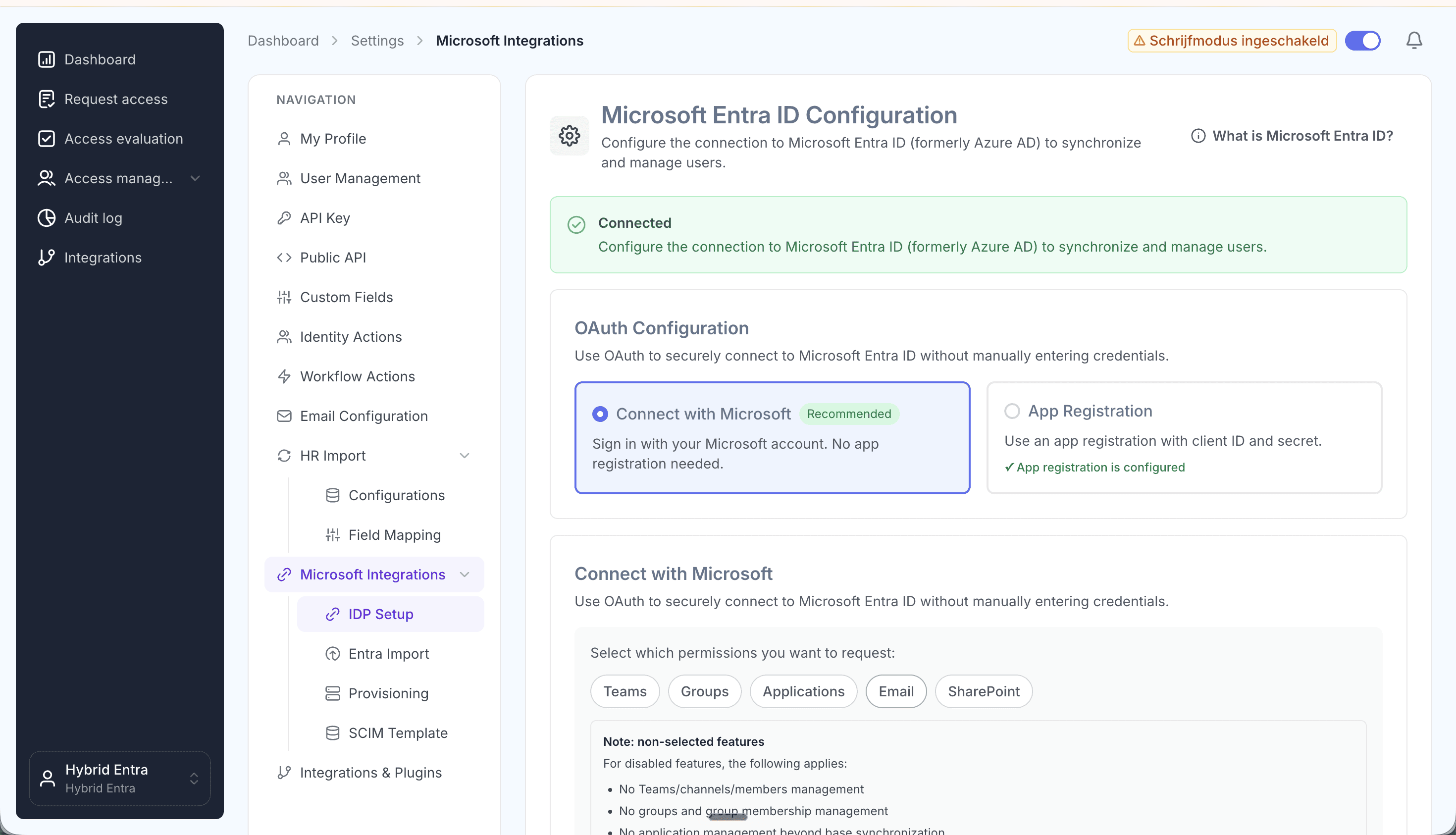
Connect your Microsoft tenant and pick your scopes.
3. Import your existing accounts from Entra ID
Import all existing accounts from Entra ID at platform.joinly.app/settings/provisioning/entra-import. This gives Joinly a baseline of every account that already exists, so it can match people to their current account instead of creating duplicates.
4. Find the INAZ integration in the Joinly marketplace
Open the Joinly marketplace and search for the INAZ integration.
Don’t see your system listed? Get in touch at support@koppelhet.nl and we’ll help you out.
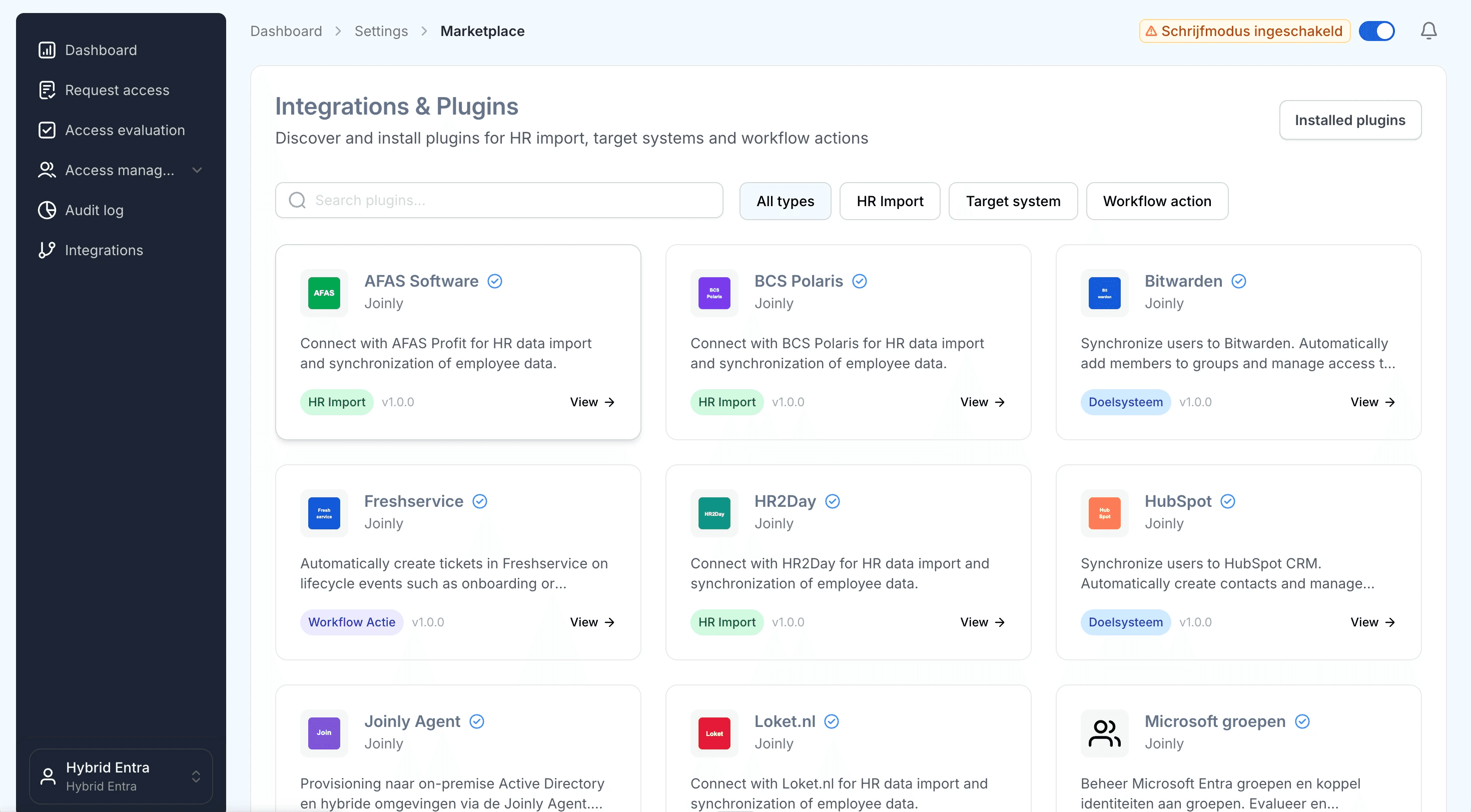
Search the marketplace for the INAZ integration.
5. Follow the installation wizard
You may be redirected to integrations.joinly.app. Create an account there and enter your INAZ connection details. Because INAZ can be deployed on-premise, as SaaS/ASP/Cloud or through a BPO service, the wizard asks for the channel your instance exposes — a scheduled structured export (file / record path), a database endpoint or a middleware feed. We only ask for the information needed to establish a successful connection with INAZ. All data is encrypted and stored securely.
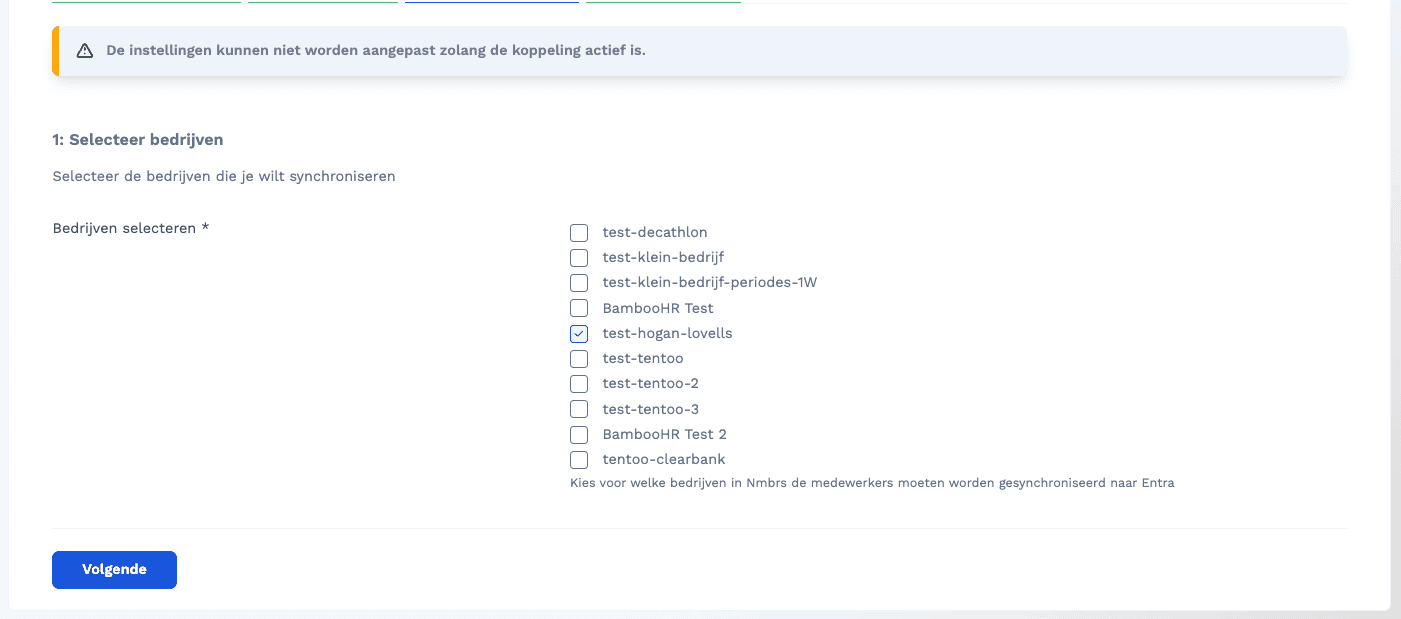
Enter your INAZ connection details in the wizard.
6. Configure your field mapping
Set up all your field mappings here. Templates support Liquid, so you can build your display name, UPN and other attributes dynamically from INAZ fields.
Frequently asked questions
How do I map the manager? Reference the manager’s identifier from the INAZ export in the mapping and Joinly resolves the link to the right manager automatically.
Which INAZ fields should I map? Map the org data you actually need — name, department, job title, cost centre, start and end date — and leave Italian payroll fields like the codice fiscale in INAZ.
How do I prevent duplicate usernames? Use the
generateUniqueUsernamehelper, which falls back to the next pattern when the first one is already taken:{{ generateUniqueUsername: “{firstName}.{prefix}.{lastName}”, “{initials}.{prefix}.{lastName}” }}
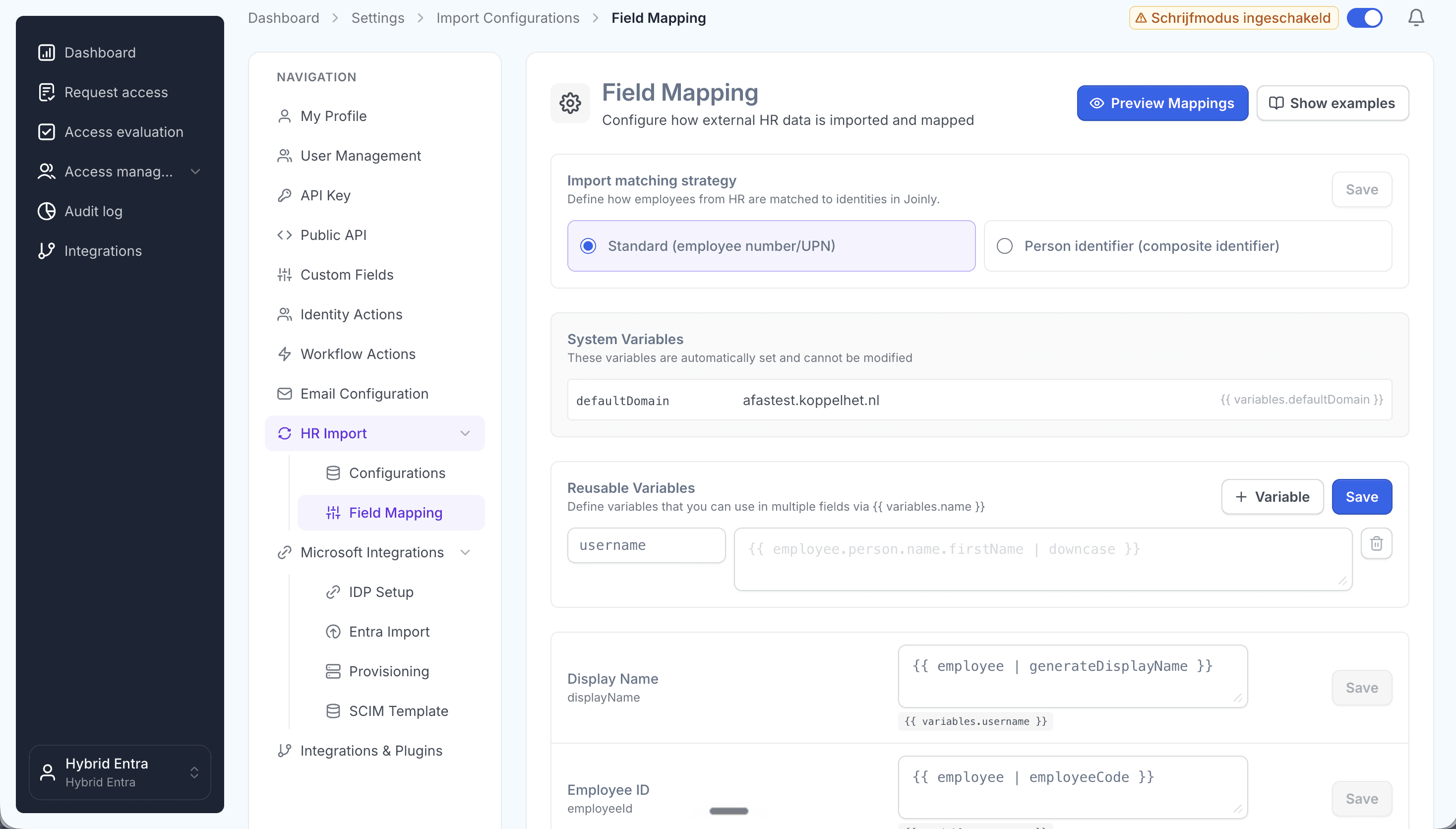
Map INAZ fields to Entra ID attributes with Liquid templates.
7. Configure the scheduled import
At platform.joinly.app/settings/import-configs, configure how often the import from INAZ should run.
8. Configure your workflows
Workflows are where Joinly turns each HR change into the right action in Entra ID. Create an onboarding (joiner) and offboarding (leaver) workflow with trigger-based execution, then an Identity updated workflow with a Create/update employee in Entra action so every change in HR Inaz flows straight through to Entra ID. Finally, add a threshold workflow with the Entra soft delete action that runs a set period after the end date (for example 30 days) to retire accounts safely.
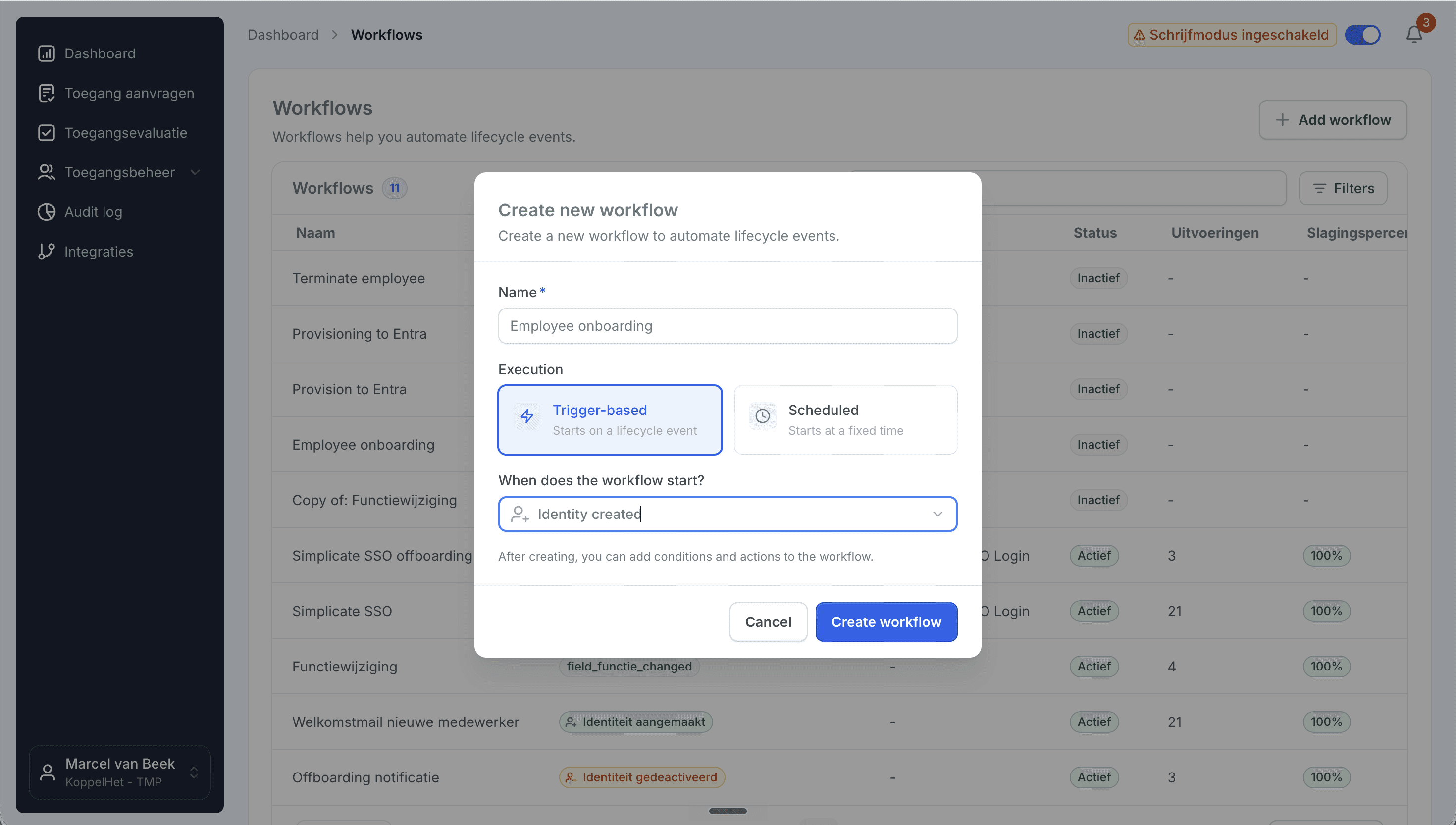
Create a trigger-based onboarding workflow.
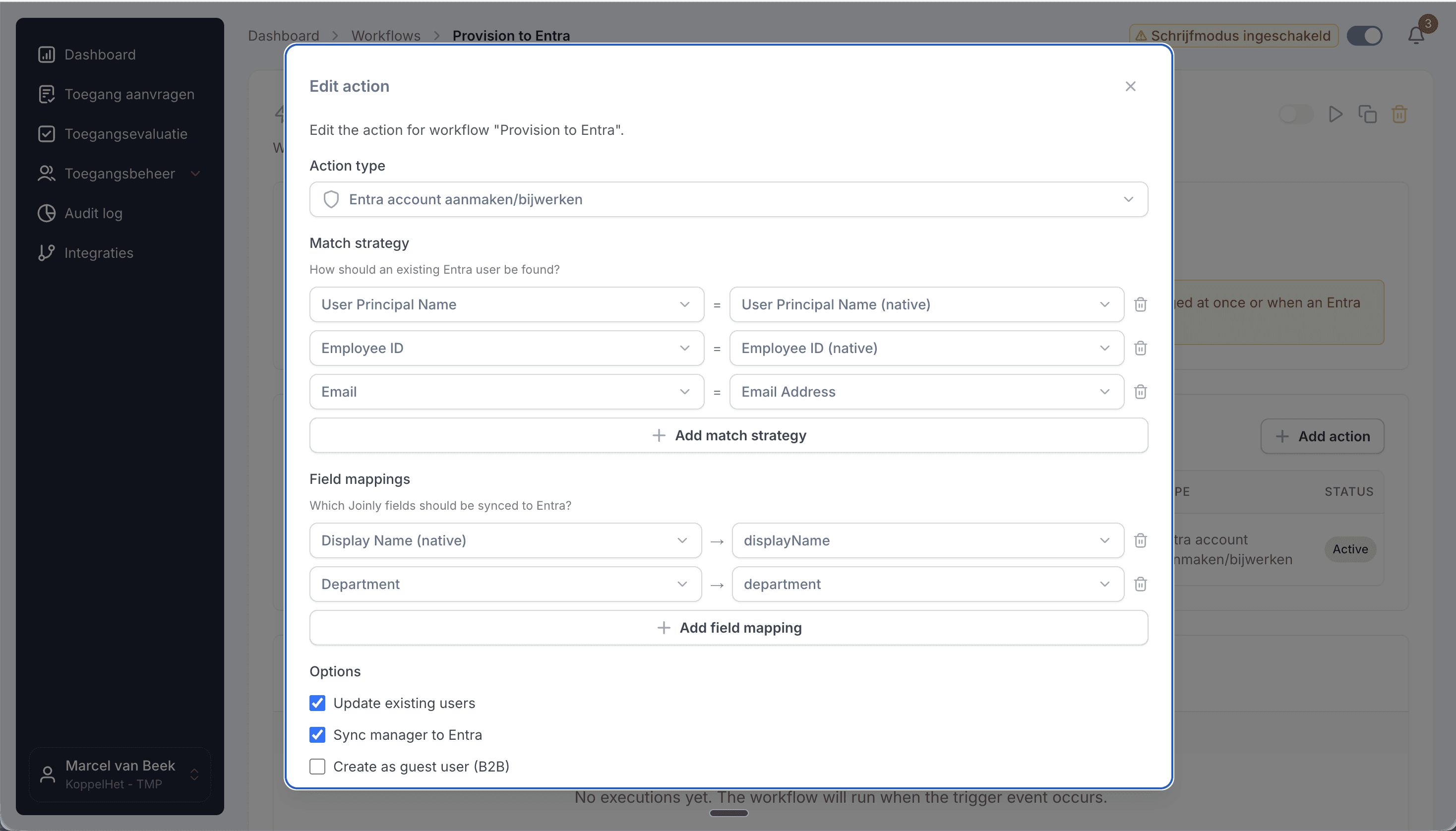
Add the create/update action, then set your matching strategy and field mapping.
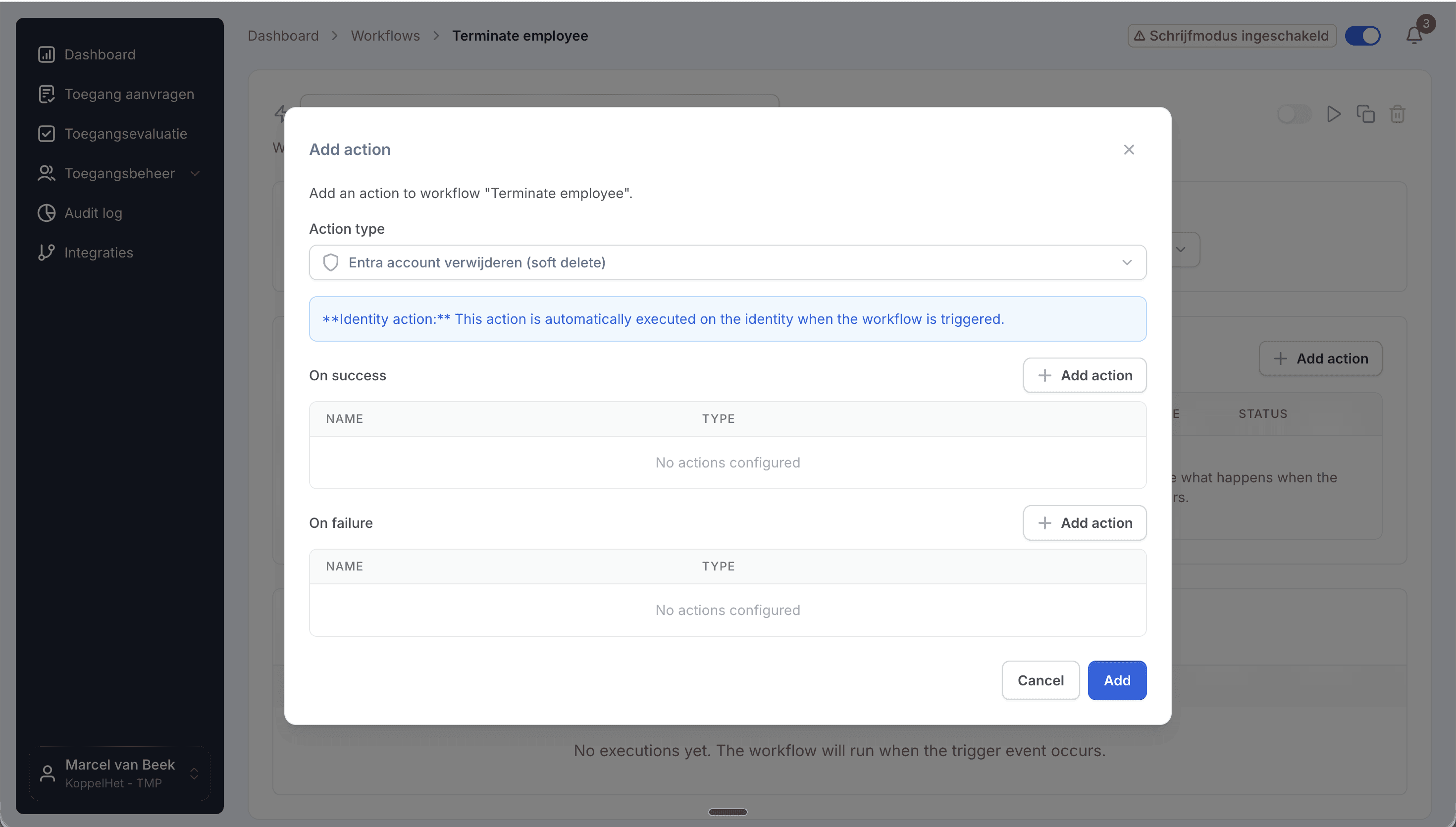
Add the Entra soft delete action to retire accounts safely.
## AD on-premise support
Need to provision to an on-premise Active Directory as well? See our dedicated guide on connecting INAZ to Active Directory, or contact support at support@koppelhet.nl to request setup of the Joinly AD Agent.
Frequently asked questions
Does INAZ have an API for connecting to Entra ID?
INAZ does not publish a general-purpose provisioning API; it describes itself as ‘fully integrable’ and interfaces with common databases and structured exports. Joinly connects on top of whatever channel your deployment exposes — a scheduled file / record-path export, a database feed or a middleware channel — and confirms the exact route during onboarding.
Does the INAZ to Microsoft Entra ID connection work in real time?
It runs as a frequent sync that updates multiple times per day, so changes in HR Inaz reach Entra ID quickly. Because INAZ exports are typically batch-scheduled, the cadence follows your import schedule rather than an instant push.
My INAZ is deployed on-premise / as a BPO service — does Joinly still work?
Yes. Joinly is built to read whichever channel your deployment exposes, whether that is an on-premise user licence, SaaS/ASP/Cloud, or a fully outsourced BPO service. The connection method is agreed during onboarding.
Which attributes sync from INAZ to Entra ID?
Name, email / UPN, department, job title, manager, cost centre, organisational unit, and start and end date. Italian payroll fields such as the codice fiscale stay in INAZ unless you explicitly choose to map them.
Is there a native INAZ connector for Entra ID?
No. There is no out-of-the-box INAZ-to-Entra connector, so teams usually build a custom file feed or process a list by hand. Joinly replaces that with automated, rule-based provisioning, including role-to-group mapping the native path leaves to you.
Does Joinly also support AD on-premise or hybrid provisioning?
Yes. Joinly has its own AD on-premise agent and also supports the native Microsoft Entra provisioning agent, so you can provision users to your on-premise AD environment as well. See the INAZ to Active Directory guide.
More than a connector
A standalone INAZ to Entra ID connection is a good start, but identity rarely stops at one target. Joinly manages the complete chain from joiner to leaver across all your systems, with logging and governance built in. You review the exceptions; Joinly maintains the chain.
Request installation support
Other guides
Frequently asked
Questions about connecting INAZ to Microsoft Entra ID (formerly Azure AD)
How does Joinly connect INAZ to Microsoft Entra ID?
The connection reads HR changes at the source (INAZ HR export (structured file / record path, database or middleware) → Joinly → Entra ID.) Authentication: Secured connection to the export/feed your INAZ deployment exposes; credentials encrypted at rest. Joinly writes to Entra ID through Microsoft Graph, with its own app registration and application permissions — no synchronisation server, agent or extra infrastructure. If you prefer Microsoft's API-driven provisioning endpoint, Joinly can deliver the same changes as a SCIM 2.0 bulk request instead.
Which HR events does the INAZ → Entra ID connection handle?
Joiner, mover, leaver (incl. rehire and internal transfer). Each event runs the workflow you configured for it: a joiner gets an account, groups and licences before the start date, a mover has the access of the old position removed and the new one added, and a leaver is disabled on the termination date.
Which INAZ attributes are synced to Entra ID?
Name, email / UPN, department, job title, manager, cost centre, organisational unit, start and end date. The mapping is configurable per field with Liquid templates, so your own naming convention for the user principal name, display name and e-mail address keeps applying.
How often does Joinly sync INAZ with Entra ID?
Frequent sync, multiple times per day. The import schedule is yours to set — hourly, daily or weekly at a fixed time — and every run only processes what changed since the previous one.
Will Joinly overwrite the accounts that already exist in Entra ID?
No. Joinly first imports your existing directory and matches those accounts to the employees from INAZ. Existing accounts are recognised and adopted rather than created twice. Which matching strategy applies — user principal name, e-mail address, employee ID or a person identifier — is a setting.
Can I try this without anything being written?
Yes. Run the import as a dry run and you get an Excel export of exactly what would happen. You can also leave the connection in read-only mode, where Joinly calculates everything but writes nothing, and set thresholds for how many creations, activations and deactivations one run may produce before it is blocked for approval.
Is INAZ a ready-made connector in Joinly?
Yes. INAZ is a ready-made HR connector in Joinly: you enable it, enter the details of your INAZ environment and Joinly reads the employees from there. Nothing has to be developed on either side.
What happens when someone has more than one contract in INAZ?
Joinly recognises that it is one person and decides which employment leads for the account, the manager and the department. You do not get two accounts for the same employee, and when one contract ends the account is only disabled when the last active employment ends.
Do I need a Microsoft Entra ID P1 or P2 licence for this?
Not for the Microsoft Graph path: Joinly uses its own app registration and the permissions you grant it. Microsoft's API-driven inbound provisioning endpoint, which Joinly can also target with SCIM bulk requests, follows Microsoft's own licensing for that feature.
Does the INAZ → Entra ID connection support NIS2 and ISO 27001?
ISO 27001, NIS2-ready, GDPR (EU data centre). Every mutation lands in the audit log with its source — HR import, manual, from Entra, by the system or through an API key — and a link to the workflow that caused it. That is the evidence an auditor asks for when they want to know who had access to what, and why.
More on INAZ
Everything Joinly publishes about INAZ: the other installation guide, how the connection compares with Microsoft's own provisioning, what offboarding looks like, and the SCIM route.
See what Joinly can do for your organisation?
Start a free trial today or get in touch for advice on your HR and Microsoft environment.